Where is this feature available?
 Open-source
 Self-Serve
What can you do with groups?
Groups are how you track and perform analysis on the aggregation of an something other than a user.
Group Analytics
You can perform any type of analytics (e.g. Trends, Funnels, Retention, etc.) based on groups rather than users (e.g. Number of companies who signed up in the last 28 days, Number of total transactions in the past 14 days, etc.)
Feature flags
You can use groups to roll-out your feature flags more consistently. Instead of giving users in the same organization a different experience, roll out the feature flag to whole organizations.
How our solution works?
With groups, there's two important concepts to remember. These are Groups and Group Types.
Groups vs Group Types
The simplest example of a group type is a company, users from multiple companies that might use your product - groups allows you do to analytics on these - e.g. Daily Active Companies.
The group types determine what kind of groups you have. For example, a company is a group type. A transaction is a group type. There's a hard limit of 5 group types you can create, so think carefully about what group types you want.
A group is a specific instance of a group type. For example, if company is a group type, then PostHog, Tesla, IBM, SpaceX are the groups. You can have unlimited groups.
As another example, if transaction is a group type, then each transactionID is a group.
Defining groups
Note: You must include at least one group property for a group to be visible in the "Persons & Groups" tab
Groups are at the event level. If everything is setup correctly, then events that come into PostHog have a group associated with them, which is determined by you. See below for how to set this up.
Thus, there's no new events corresponding to groups: it's simply the events that already exist, aggregated by group values.
A popular misconception is that groups are defined per user. This might make sense if the group type is a company, since a company is a set of users, but it quickly breaks down when you're looking at a transaction group type: here a user can do multiple transactions. Thus, remember that groups are defined on events.
If users belong to multiple companies, e.g. internal staff members accessing multiple company accounts. We assume that the user was part of that company for the duration of that event and not that the user was part of two companies at the same time.
Another important concept to remember here is that a single event belongs to only a single group per group type. For example, say you have a transaction occured event. And you have 3 group types: transaction, company, pineapple_type.
Then, this event can belong to at most one group per group type. So, for this event, you can have transaction = 123456789, company = PostHog, pineapple_type = British.
Warning: You can't have something like: transaction = [123456789, 12345678910]. This is not possible.
You can skip some groups if they don't make sense. For example, transaction = 123456789, company = PostHog, and no pineapple_type is valid as well.
Group Properties
Every group can have properties associated with it. For example, if you have the company group, you could have properties defined on this group, like company_name, revenue, user_count, etc. etc.
As another example, the transactionID 12345679 group of transaction group type can have properties like transaction_value, transaction_method, etc. associated with them.
These properties can be used in insights similar to how you use person properties.
Groups vs cohorts
Groups differ from cohorts, a cohort is a essentially a list of users. Whereas a groups represent every entity of a certain type.
Following the company example again, you can have a cohort of users which belong to a certain company (e.g. Company A). But you could create a group type of "companies" which represents all companies and their users.
How do I get started?
Getting access
Group analytics is a premium feature that requires an additional subscription.
- If you're self-hosting PostHog, Group Analytics is available on the Scale & Enterprise plans. Get a license now
- If you're on PostHog Cloud, you just need to set up your billing information. Group Analytics is available on all our paid plans. Set up billing
On-self hosted you must also be on the latest release: 1.31.0 or above.
Integrating tracking
To make use of group analytics, you need to update your event capture code. See the sections below for how to set it up depending on how you are sending data to PostHog.
The following examples use company as a group type and id:5 as the group key. Replace these with your particular values.
Tip: Use a singular form of the group type throughout ingestion
Update posthog-js2 to version 1.16.0 or above to make use of the new functionality.
In it's possible to declare that a user is currently "active" in a particular group. This means all events (both normal and autocaptured) are considered to be for that group.
To make sure all events get attached to groups, we recommend calling posthog.group in loaded callback.
posthog.init('[your api key]', {api_host: 'https://posthog.[your-domain].com',loaded: function(posthog) {posthog.identify('[user unique id]');posthog.group('company', 'id:5', {company_name: 'Awesome Inc',employees: 11});// A call without properties sets the group on subsequent events// but does not update propertiesposthog.group('playlist', 'id:77');}});
Subsequent calls to posthog.group() with the same group type but a different group key make the new group be active.
Handling logging out
When the user logs out it's important to call posthog.reset() to avoid new events being registered under registered groups and the logged in user.
Update posthog-python to version 1.4.3 or above to make use of the new functionality.
# Capturing an event with groupsposthog.capture('[distinct id]', 'some event', groups={'company': 'id:5'})# Updating group propertiesposthog.group_identify('company', 'id:5', {'company_name': 'Awesome Inc','employees': 11})
Update posthog-php to version 2.1.0 or above to make use of the new functionality.
# Capturing an event with groupsPostHog::capture(array('distinctId' => '[distinct id]','event' => 'some event','$groups' => array("company" => "id:5")));# Updating a groups propertiesPostHog::groupIdentify(array('groupType' => 'company','groupKey' => 'id:5','properties' => array("company_name" => "Awesome Inc", "employees" => 11)));
Using groups with go requires the latest version of posthog-go. Update dependencies via:
go get -u github.com/posthog/posthog-go
// Capturing an event with groupsclient.Enqueue(posthog.Capture{DistinctId: "[distinct id]",Event: "some event",Groups: posthog.NewGroups().Set("company", "id:5").})// Updating a groups propertiesclient.Enqueue(posthog.GroupIdentify{Type: "company",Key: "id:5",Properties: posthog.NewProperties().Set("company_name", "Awesome Inc").Set("employees", 11),})
Update posthog-node to version 1.2.0 or above to make use of the new functionality.
// Capturing an event with groupsposthog.capture({event: "some event",distinctId: '[distinct id]',groups: { company: 'id:5' }})// Updating a groups propertiesposthog.groupIdentify({groupType: 'company',groupKey: 'id:5',properties: {company_name: 'Awesome Inc',employees: 11}})
Segment browser or mobile libraries
// Capturing an event with groupsanalytics.track('[event name]', {"$groups": {"company": "id:5"}})// Updating group propertiesanalytics.track('$groupidentify', {"$group_type": "company","$group_key": "id:5","$group_set": {"company_name": "Awesome Inc","employees": 11}})
Segment backend libraries
For backend libraries you need to send a distinct id (as with any other .track call).
# Capturing an event with groupsanalytics.track('distinct_id', '[event name]', {"$groups": {"company": "id:5"}})# Updating group propertiesanalytics.track('distinct_id', '$groupidentify', {"$group_type": "company","$group_key": "id:5","$group_set": {"company_name": "Awesome Inc","employees": 11}})
Not all libraries support group analytics yet, but you can work around this issue by sending events in specific formats.
This section uses our Capture APIs for examples but you can adapt this approach to any library.
Capturing events with groups
POST https://[your-instance].com/capture/Content-Type: application/jsonBody:{"api_key": "<ph_project_api_key>","event": "[event name]","properties": {"distinct_id": "[your users' distinct id]","key1": "value1","key2": "value2","$groups": {"company": "id:5"}}}
Updating group properties
POST https://[your-instance].com/capture/Content-Type: application/jsonBody:{"api_key": "<ph_project_api_key>","event": "$groupidentify","properties": {"distinct_id": "[your users' distinct id]","$group_type": "company","$group_key": "id:5","$group_set": {"company_name": "Awesome Inc","employees": 11}}}
Analysing group insights
Once you have integrated tracking for groups this will unlock the ability to analyze based on them.
Since there's no new events, you can use the same events you've been using for your insights. It's the same funnel you already have, aggregated differently.
The groups determine what your insights aggregate on. For example, consider the funnel with two events: User signed up -> User activated
Traditionally, you'd only have unique users in the funnel: Users from any and every company who're using your product and doing something important. Your conversion rate is per user. But what if you're interested in looking at this conversion rate across companies? Say, you're a B2B product and doing something important once per company is good enough. Then the funnel you want to track is User signed up -> User activated aggregated by unique companies, not users.
That's a group aggregation over the company group type. It's the same events, aggregated differently.
What if you wanted to breakdown this funnel by company name? Maybe there's specific companies that never converted, and you want to follow up with them to see what's going wrong. Like mentioned above, if you have group properties defined, you can breakdown by company_name.
Viewing groups and their properties
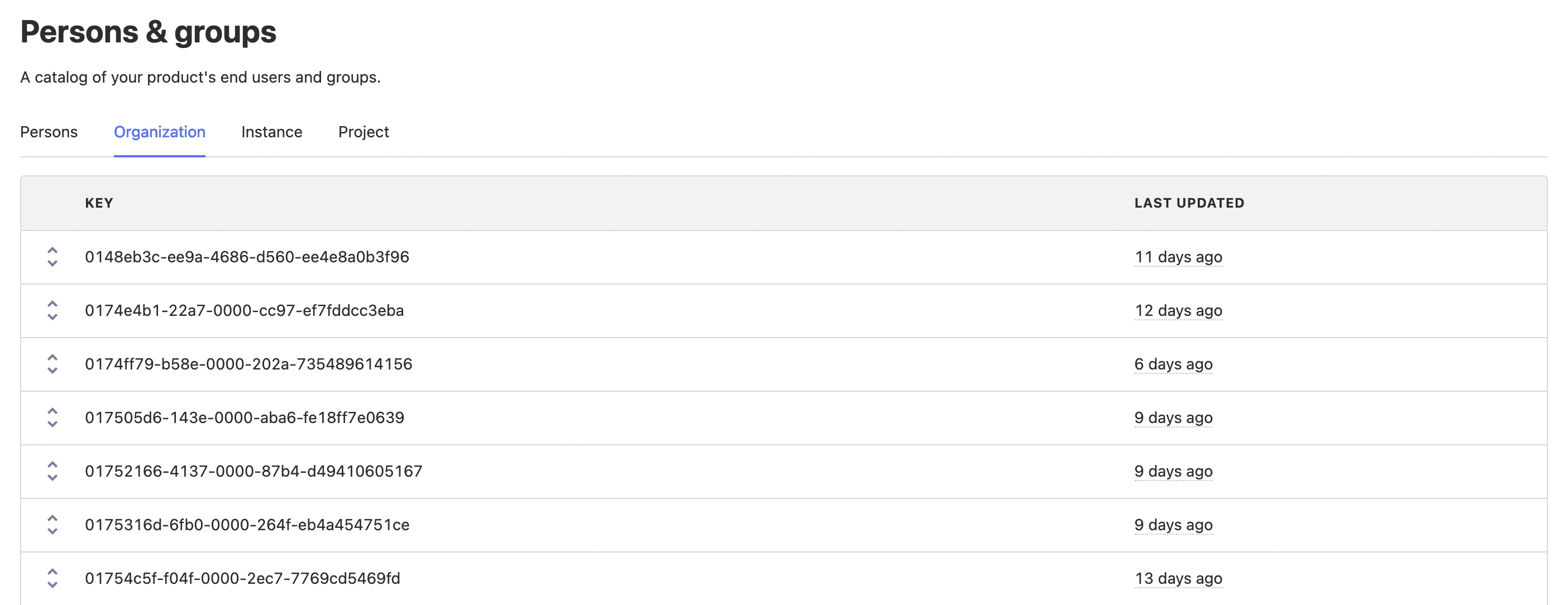
To view groups and their properties, head to the "Persons and Groups" tab on the navigation bar.
From here you can select the group type you are interested in and view the groups and properties (by clicking the chevrons on the left).
Organizations signed up in last week
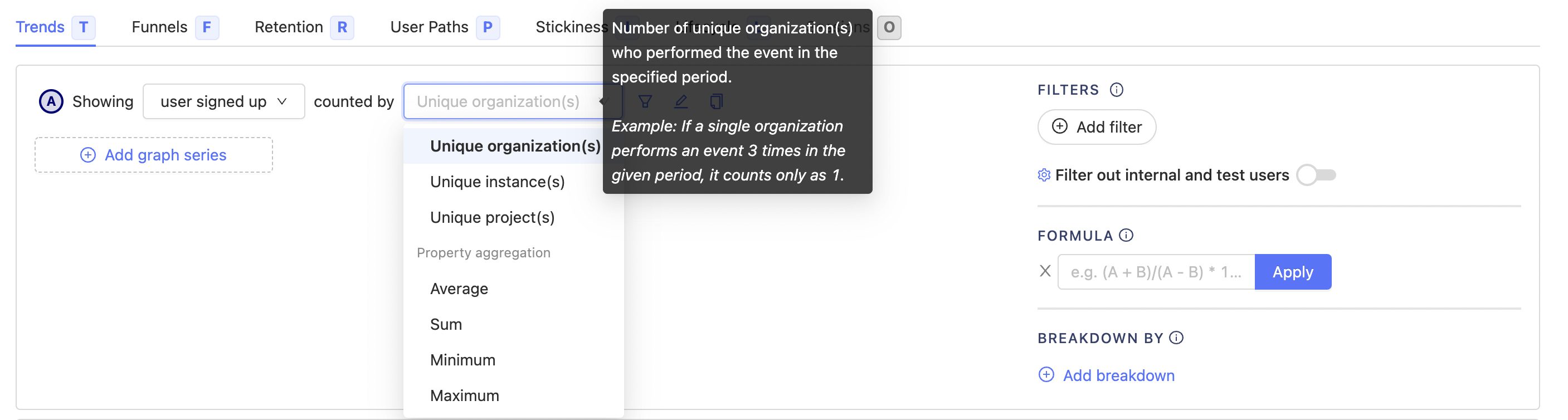
If we wanted to see how many organizations signed up in the last week we can create a trends insight and set the event to be our sign up event and the "counted by" "unique organization(s)", you should see all of your group types here.
This will show us the trend of sign ups by organization as opposed to per user.
Organization signup funnel
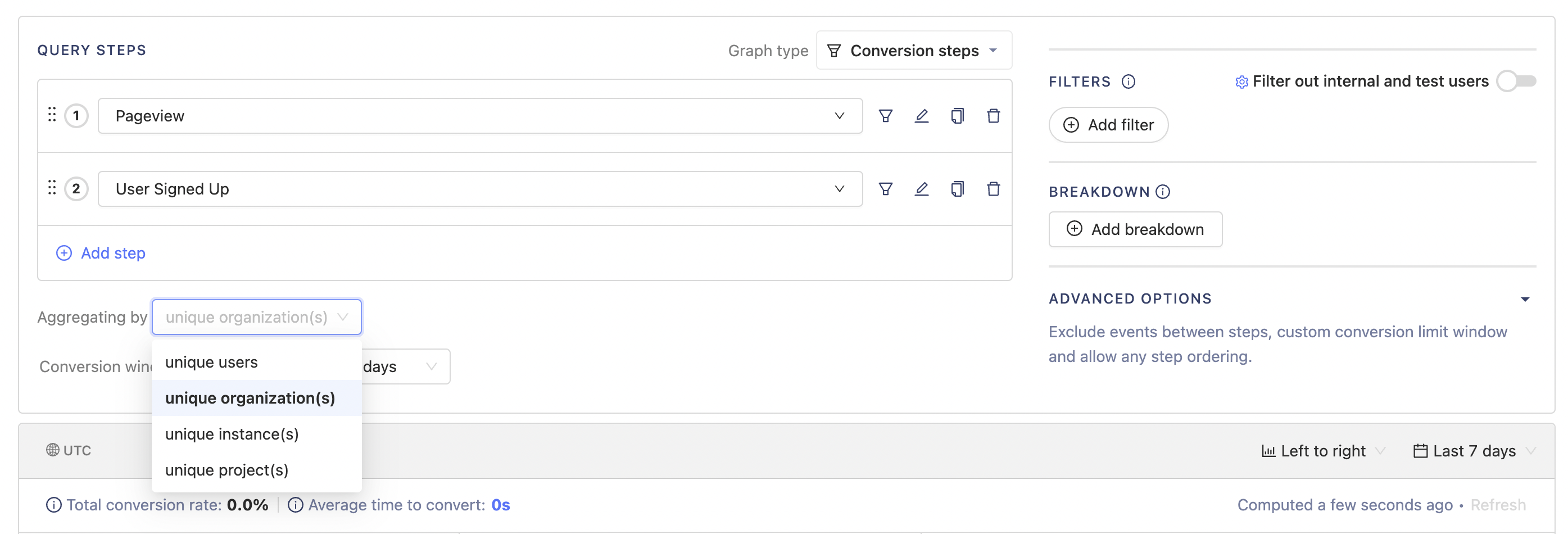
You can use groups in many insights, for example in a funnel you may want to understand how an organization moves from their first visit to signing up. You can set the "aggregating by" to be the group type you wish to aggregate by.
This will show how many organizations have made it through the funnel as opposed to individual users.
Naming groups
The PostHog UI identifies a group using the name property. If no name property is found, it falls back to the group key.
So, if you call posthog.group as below:
posthog.group('the_example_group', 'group-uuid', {uuid: 'some-random-uuid',company_name: 'the company_name property',})
The UI will have a the_example_group tab and a group showing up as 'group-uuid'.
If instead you call
posthog.group('the_example_group', 'group-uuid', {uuid: 'some-random-uuid',name: 'the name property',company_name: 'the company_name property',})
Then the group will show up as the name property instead of group-uuid.
How to think about Feature Flags with groups
Similar to insights, where you're aggregating events by group type, you can have Feature Flags that work on groups. This allows you to rollout a feature by company, instead of users. Preventing disruption when two users at the same company see a different experience.
You can use feature flags as you normally would, except you need to select the group type you wish to "Match by", using the drop down by release conditions.
You will also need to update your event tracking code (covered below), for the feature flag to be able to determine the groups of the current user.
Integrating groups with feature flags
If you have updated tracking, you can use group-based feature flags as normal in posthog-js.
if (posthog.isFeatureEnabled('new-groups-feature')) {// do something}
To check flag status for a different group, first switch the active group via a posthog.group() call.
Update posthog-python to version 1.4.3 or above to make use of the new functionality.
To check a flag that's matching by companies, specify groups in relevant call:
if posthog.feature_enabled("new-groups-feature", "[distinct id]", groups={"company": "id:5"}):# do something
Update posthog-php to version 2.1.0 or above to make use of the new functionality.
To check a flag that's matching by companies, specify groups in relevant feature flag call:
if (PostHog::isFeatureEnabled('new-groups-feature', '[distinct id]', false, array("company" => "id:5"))) {// Do something}
posthog-go does not yet support feature flags with groups.
Missing this? Let us know
Update posthog-node to version 1.2.0 or above to make use of the new functionality.
To check a flag that's matching by companies, specify groups in relevant feature flag call:
const isFlagEnabled = await posthog.isFeatureEnabled('new-groups-feature', '[distinct id]', false, { company: 'id:5' })if (isFlagEnabled) {// Toggle feature-flag specific behavior}
Renaming group types
You can change how group types are displayed in your Insights interface and throughout PostHog on Project settings.
Limitations
- A maximum of 5 group types can be created per project
- Multiple groups of the same type cannot assigned to a single event (e.g. Company A & Company B)
- Groups are not currently supported for the following insights:
- Lifecycle - Expected soon
- User Paths - These only support user level analytics
- Sessions - This is being deprecated, group support will not be added
- Only groups with known properties are shown under 'Persons & groups'
- Groups cannot be directly deleted
Please reach out if you have feedback!
Further reading
Want to know more about what's possible with Groups in PostHog? Try these tutorials:
Want more? Check our full list of PostHog tutorials.