• Product
  • Pricing
  • Docs
  • Using PostHog
  • Community
  • Company
  • Login
  • Docs

  • Overview
    • Quickstart with PostHog Cloud
    • Overview
      • AWS
      • Azure
      • DigitalOcean
      • Google Cloud Platform
      • Hobby
      • Other platforms
      • Instance settings
      • Environment variables
      • Securing PostHog
      • Monitoring with Grafana
      • Running behind a proxy
      • Configuring email
      • Helm chart configuration
      • Deploying ClickHouse using Altinity.Cloud
      • Configuring Slack
      • Overview
        • Overview
        • Upgrade notes
        • Overview
        • 0001-events-sample-by
        • 0002_events_sample_by
        • 0003_fill_person_distinct_id2
        • ClickHouse
          • Backup
          • Kafka Engine
          • Resize disk
          • Restore
          • Vertical scaling
          • Horizontal scaling (Sharding & replication)
        • Kafka
          • Resize disk
          • Log retention
        • PostgreSQL
          • Resize disk
          • Troubleshooting long-running migrations
        • Plugin server
        • MinIO
        • Redis
        • Zookeeper
      • Disaster recovery
    • Troubleshooting and FAQs
    • Managing hosting costs
    • EU-only hosting
    • Overview
    • Ingest live data
    • Ingest historical data
    • Identify users
    • User properties
    • Deploying a reverse proxy
    • Libraries
    • Badge
      • Snippet installation
      • Android
      • iOS
      • JavaScript
      • Flutter
      • React Native
      • Browser Extensions
      • Elixir
      • Go
      • Java
      • Node.js
      • PHP
      • Python
      • Ruby
      • Docusaurus v2
      • Gatsby
      • Google Tag Manager
      • Next.js
      • Nuxt.js
      • Retool
      • RudderStack
      • Segment
      • Sentry
      • Slack
      • Shopify
      • WordPress
      • Message formatting
      • Microsoft Teams
      • Slack
      • Discord
    • To another self-hosted instance
    • To PostHog from Amplitude
    • Between Cloud and self-hosted
    • Overview
    • Tutorial
    • Troubleshooting
    • TypeScript types
    • Developer reference
    • Overview
    • POST-only public endpoints
    • Actions
    • Annotations
    • Cohorts
    • Dashboards
    • Event definitions
    • Events
    • Experiments
    • Feature flags
    • Funnels
    • Groups
    • Groups types
    • Insights
    • Invites
    • Members
    • Persons
    • Plugin configs
    • Plugins
    • Projects
    • Property definitions
    • Session recordings
    • Trends
    • Users
    • Data model
    • Overview
    • Data model
    • Ingestion pipeline
    • ClickHouse
    • Querying data
    • Overview
    • GDPR guidance
    • HIPAA guidance
    • CCPA guidance
    • Data egress & compliance
    • Data deletion
    • Overview
    • Code of conduct
    • Recognizing contributions
  • Using PostHog

  • Table of contents
      • Dashboards
      • Funnels
      • Group Analytics
      • Insights
      • Lifecycle
      • Path analysis
      • Retention
      • Stickiness
      • Trends
      • Heatmaps
      • Session Recording
      • Correlation Analysis
      • Experimentation
      • Feature Flags
      • Actions
      • Annotations
      • Cohorts
      • Data Management
      • Events
      • Persons
      • Sessions
      • UTM segmentation
      • Team collaboration
      • Organizations & projects
      • Settings
      • SSO & SAML
      • Toolbar
      • Notifications & alerts
    • Overview
      • Amazon Kinesis Import
      • BitBucket Release Tracker
      • Braze Import
      • Event Replicator
      • GitHub Release Tracker
      • GitHub Star Sync
      • GitLab Release Tracker
      • Heartbeat
      • Ingestion Alert
      • Email Scoring
      • n8n Connector
      • Orbit Connector
      • Redshift Import
      • Segment Connector
      • Shopify Connector
      • Twitter Followers Tracker
      • Zendesk Connector
      • Airbyte Exporter
      • Amazon S3 Export
      • BigQuery Export
      • Customer.io Connector
      • Databricks Export
      • Engage Connector
      • GCP Pub/Sub Connector
      • Google Cloud Storage Export
      • Hubspot Connector
      • Intercom Connector
      • Migrator 3000
      • PagerDuty Connector
      • PostgreSQL Export
      • Redshift Export
      • RudderStack Export
      • Salesforce Connector
      • Sendgrid Connector
      • Sentry Connector
      • Snowflake Export
      • Twilio Connector
      • Variance Connector
      • Zapier Connector
      • Downsampler
      • Event Sequence Timer
      • First Time Event Tracker
      • Property Filter
      • Property Flattener
      • Schema Enforcer
      • Taxonomy Standardizer
      • Unduplicator
      • Automatic Cohort Creator
      • Currency Normalizer
      • GeoIP Enricher
      • Timestamp Parser
      • URL Normalizer
      • User Agent Populator
  • Tutorials
    • All tutorials
    • Actions
    • Apps
    • Cohorts
    • Dashboards
    • Feature flags
    • Funnels
    • Heatmaps
    • Path analysis
    • Retention
    • Session recording
    • Trends
  • Support
  • Docs

  • Overview
    • Quickstart with PostHog Cloud
    • Overview
      • AWS
      • Azure
      • DigitalOcean
      • Google Cloud Platform
      • Hobby
      • Other platforms
      • Instance settings
      • Environment variables
      • Securing PostHog
      • Monitoring with Grafana
      • Running behind a proxy
      • Configuring email
      • Helm chart configuration
      • Deploying ClickHouse using Altinity.Cloud
      • Configuring Slack
      • Overview
        • Overview
        • Upgrade notes
        • Overview
        • 0001-events-sample-by
        • 0002_events_sample_by
        • 0003_fill_person_distinct_id2
        • ClickHouse
          • Backup
          • Kafka Engine
          • Resize disk
          • Restore
          • Vertical scaling
          • Horizontal scaling (Sharding & replication)
        • Kafka
          • Resize disk
          • Log retention
        • PostgreSQL
          • Resize disk
          • Troubleshooting long-running migrations
        • Plugin server
        • MinIO
        • Redis
        • Zookeeper
      • Disaster recovery
    • Troubleshooting and FAQs
    • Managing hosting costs
    • EU-only hosting
    • Overview
    • Ingest live data
    • Ingest historical data
    • Identify users
    • User properties
    • Deploying a reverse proxy
    • Libraries
    • Badge
      • Snippet installation
      • Android
      • iOS
      • JavaScript
      • Flutter
      • React Native
      • Browser Extensions
      • Elixir
      • Go
      • Java
      • Node.js
      • PHP
      • Python
      • Ruby
      • Docusaurus v2
      • Gatsby
      • Google Tag Manager
      • Next.js
      • Nuxt.js
      • Retool
      • RudderStack
      • Segment
      • Sentry
      • Slack
      • Shopify
      • WordPress
      • Message formatting
      • Microsoft Teams
      • Slack
      • Discord
    • To another self-hosted instance
    • To PostHog from Amplitude
    • Between Cloud and self-hosted
    • Overview
    • Tutorial
    • Troubleshooting
    • TypeScript types
    • Developer reference
    • Overview
    • POST-only public endpoints
    • Actions
    • Annotations
    • Cohorts
    • Dashboards
    • Event definitions
    • Events
    • Experiments
    • Feature flags
    • Funnels
    • Groups
    • Groups types
    • Insights
    • Invites
    • Members
    • Persons
    • Plugin configs
    • Plugins
    • Projects
    • Property definitions
    • Session recordings
    • Trends
    • Users
    • Data model
    • Overview
    • Data model
    • Ingestion pipeline
    • ClickHouse
    • Querying data
    • Overview
    • GDPR guidance
    • HIPAA guidance
    • CCPA guidance
    • Data egress & compliance
    • Data deletion
    • Overview
    • Code of conduct
    • Recognizing contributions
  • Using PostHog

  • Table of contents
      • Dashboards
      • Funnels
      • Group Analytics
      • Insights
      • Lifecycle
      • Path analysis
      • Retention
      • Stickiness
      • Trends
      • Heatmaps
      • Session Recording
      • Correlation Analysis
      • Experimentation
      • Feature Flags
      • Actions
      • Annotations
      • Cohorts
      • Data Management
      • Events
      • Persons
      • Sessions
      • UTM segmentation
      • Team collaboration
      • Organizations & projects
      • Settings
      • SSO & SAML
      • Toolbar
      • Notifications & alerts
    • Overview
      • Amazon Kinesis Import
      • BitBucket Release Tracker
      • Braze Import
      • Event Replicator
      • GitHub Release Tracker
      • GitHub Star Sync
      • GitLab Release Tracker
      • Heartbeat
      • Ingestion Alert
      • Email Scoring
      • n8n Connector
      • Orbit Connector
      • Redshift Import
      • Segment Connector
      • Shopify Connector
      • Twitter Followers Tracker
      • Zendesk Connector
      • Airbyte Exporter
      • Amazon S3 Export
      • BigQuery Export
      • Customer.io Connector
      • Databricks Export
      • Engage Connector
      • GCP Pub/Sub Connector
      • Google Cloud Storage Export
      • Hubspot Connector
      • Intercom Connector
      • Migrator 3000
      • PagerDuty Connector
      • PostgreSQL Export
      • Redshift Export
      • RudderStack Export
      • Salesforce Connector
      • Sendgrid Connector
      • Sentry Connector
      • Snowflake Export
      • Twilio Connector
      • Variance Connector
      • Zapier Connector
      • Downsampler
      • Event Sequence Timer
      • First Time Event Tracker
      • Property Filter
      • Property Flattener
      • Schema Enforcer
      • Taxonomy Standardizer
      • Unduplicator
      • Automatic Cohort Creator
      • Currency Normalizer
      • GeoIP Enricher
      • Timestamp Parser
      • URL Normalizer
      • User Agent Populator
  • Tutorials
    • All tutorials
    • Actions
    • Apps
    • Cohorts
    • Dashboards
    • Feature flags
    • Funnels
    • Heatmaps
    • Path analysis
    • Retention
    • Session recording
    • Trends
  • Support
  • Using PostHog
  • Product manual
  • Data
  • Events

Events

Last updated: Sep 07, 2022

On this page

  • Live events
  • Event properties
  • Event filtering
  • Boolean (true or false)
  • Dates and Timestamps
  • Numeric
  • Strings (text)
  • Everything else
  • Autocapture event tracking
  • Limitations of autocapture
  • Push-based event tracking
  • Further reading
Where is this feature available?
Self-hosted plans
  • AvailableOpen-source
  • AvailableSelf-Serve
  • AvailableEnterprise
Cloud plans
  • AvailableFree
  • AvailableStartup
  • AvailableSelf-Serve
  • AvailableEnterprise

The most important thing that PostHog does is to capture events from your website or application. An event is any action a user takes on your website or in your application - if they click a button or visits a page, that's an event.

Live events
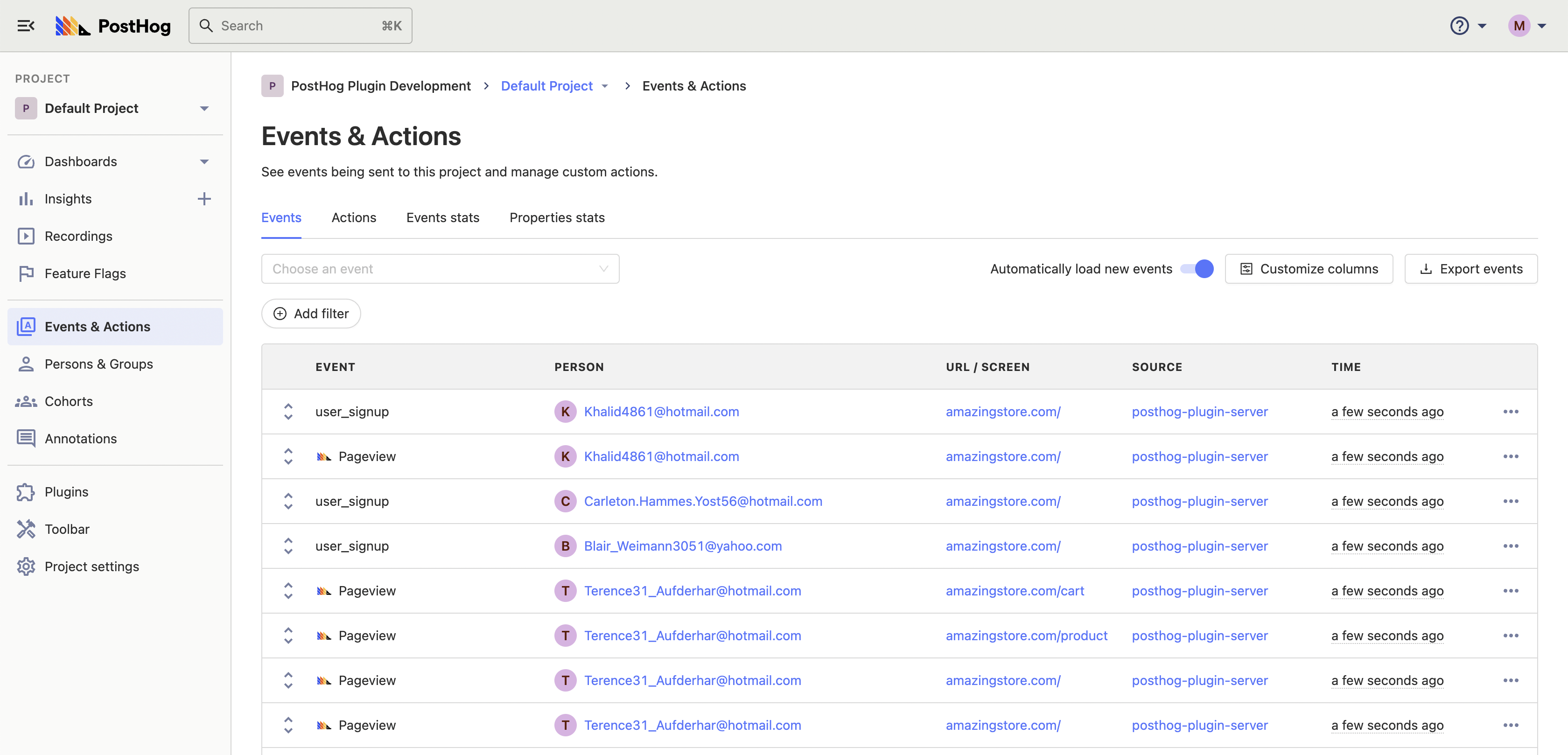
Events table

To see your live events table, click 'Events' on the left sidebar. Here you will see a live feed of Events as they are happening.

Event properties

You can view the properties of each event by clicking on the items in the ‘Event’ column:
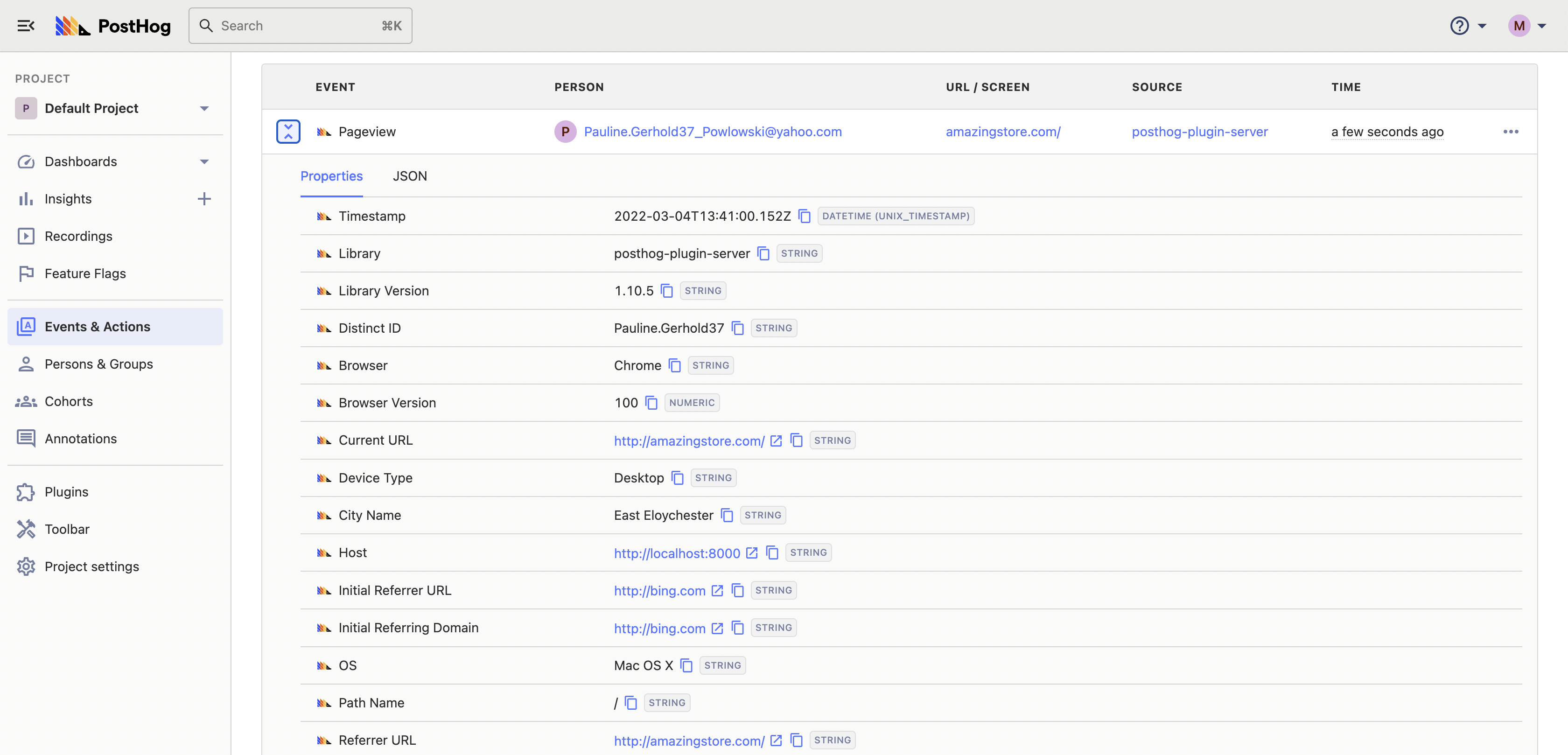
Events table

You can also click each user to view a their entire event history.

Event filtering

You can filter events by properties and cohorts to focus on specific events that are occurring in your project.

While ingesting events in the plugin server PostHog detects some type information for properties to allow more intelligent filtering.

PostHog detects:

  • Boolean
  • Dates and Timestamps
  • Numbers
  • Strings
  • Everything else

If you feel something has been detected incorrectly, you can manually change the type by going to Data management -> Properties -> Choose event -> Edit, and then changing the property type manually.

Boolean (true or false)

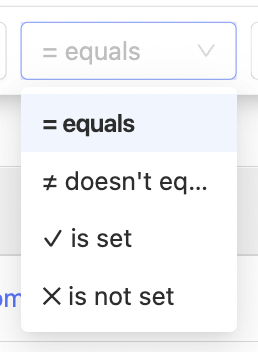
PotHog detects boolean values and allows filtering by only:

  • equals
  • doesn't equal
  • is set
  • is not set

query list for a boolean property lists only equals, doesn't equal, is set, and is not set

Dates and Timestamps

PostHog detects several formats of string as dates and times

  • YYYY-MM-DD,
  • Date and date and time strings from the ISO8601 standard,
  • YYYY-MM-DD HH:mm:SS,
  • DD-MM-YYYY HH:mm:SS,
  • DD/MM/YYYY HH:mm:SS,
  • YYYY/MM/DD HH:mm:SS
  • the RFC 822 standard

In detection day and month are interchangeable so MM-DD-YYYY would be detected as a date.

Ten and Thirteen digit numbers are detected as timestamps if the property name includes "time" or "timestamp"

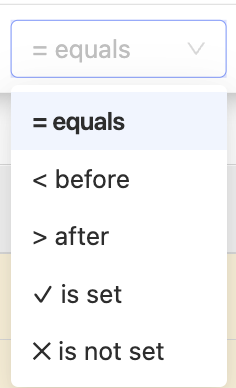
Filtering against that property will then show a date picker and allows filtering only:

  • equals
  • before
  • after
  • is set
  • is not set

query list for a date time property lists only equals, before, after, is set, is not set

Numeric

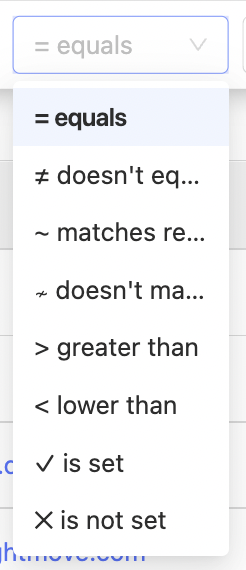
PostHog detects numeric properties and allow filtering by only:

  • equals
  • doesn't equal
  • matches regex
  • doesn't match regex
  • greater than
  • lower than
  • is set
  • is not set

query list for a numeric property lists equals, doesn't equal, matches regex, doesn't match regex, greater than, lower than, is set, and is not set

Strings (text)

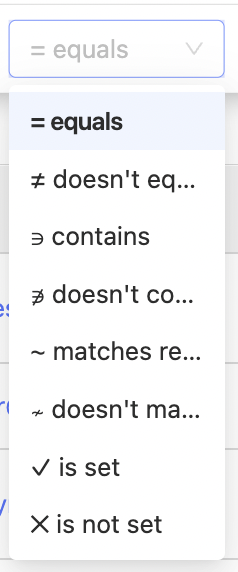
PostHog detects text content. If it is not true/false, numeric, or a date time. You can filter by:

  • equals
  • doesn't equal
  • contains
  • doesn't contain
  • matches regex
  • doesn't match regex
  • is set
  • is not set

query list for a string property lists equals, doesn't equal, contains, doesn't contain, matches regex, doesn't match regex, is set, and is not set

Everything else

If PostHog does not detect a type for an event property. You can choose any of the possible filters.

Autocapture event tracking

PostHog can capture all front-end events automatically using a small JavaScript snippet. This means you do not need to add tracking to individual buttons, or parts of your product to get started at analyzing user behavior.

Limitations of autocapture

While autocapture allows you to track the majority of general events on your website right out of the gate, it is important to note that, for security reasons, PostHog is very conservative regarding input tags. In order to prevent passwords or other sensitive data from being collected, very little data is collected from inputs with autocapture.

Specifically, PostHog autocapture will grab only the name, id, and class attributes from input tags.

If you need to collect more data from inputs, you should use custom events and Actions.

Push-based event tracking

Most users of PostHog will want to combine their back-end data, such as user information, with the front end actions of those users in their UI. There are three ways of passing data to PostHog:

  • Our API
  • JS snippet
  • Client- and server-side libraries

Further reading

Want to know more about what's possible with Events in PostHog? Try these tutorials:

  • How to trigger Discord notifications when an action is detected in PostHog
  • How to automatically organize PostHog actions in Notion
  • The complete guide to event tracking

Want more? Check our full list of PostHog tutorials.

Questions?

Was this page useful?

Next article

Persons

PostHog tracks user behaviour, whether or not the user is logged in and identifiable. Viewing user list Click on 'Persons & Groups' on the left-hand navigation. This will open a list containing all users, which you can then search. If you have added properties to your users (e.g. email), these will also appear here. Clicking the arrows next to the user will expand and show all of that user's properties. User history Clicking on an individual person brings up their entire event history, as well…

Read next article

Share

Jump to:

  • Live events
  • Event properties
  • Event filtering
  • Boolean (true or false)
  • Dates and Timestamps
  • Numeric
  • Strings (text)
  • Everything else
  • Autocapture event tracking
  • Push-based event tracking
  • Further reading
  • Questions?
  • Edit this page
  • Raise an issue
  • Toggle content width
  • Toggle dark mode
  • About
  • Blog
  • Newsletter
  • Careers
  • Support
  • Contact sales

Product OS suite

Product overview

Analytics
  • Funnels
  • Trends
  • Paths

Pricing

Features
  • Session recording
  • Feature flags
  • Experimentation
  • Heatmaps

Customers

Platform
  • Correlation analysis
  • Collaboration
  • Apps

Community

Discussion
  • Questions?
  • Slack
  • Issues
  • Contact sales
Get involved
  • Roadmap
  • Contributors
  • Merch
  • PostHog FM
  • Marketplace

Docs

Getting started
  • PostHog Cloud
  • Self-hosted
  • Compare options
  • Tutorials
  • PostHog on GitHub
Install & integrate
  • Installation
  • Docs
  • API
  • Apps
User guides
  • Cohorts
  • Funnels
  • Sessions
  • Data
  • Events

Company

About
  • Our story
  • Team
  • Handbook
  • Investors
  • Careers
Resources
  • FAQ
  • Ask a question
  • Blog
  • Press
  • Merch
  • YouTube
© 2022 PostHog, Inc.
  • Code of conduct
  • Privacy
  • Terms