• Product
  • Pricing
  • Docs
  • Using PostHog
  • Community
  • Company
  • Login
  • Docs

  • Overview
    • Quickstart with PostHog Cloud
    • Overview
      • AWS
      • Azure
      • DigitalOcean
      • Google Cloud Platform
      • Hobby
      • Other platforms
      • Instance settings
      • Environment variables
      • Securing PostHog
      • Monitoring with Grafana
      • Running behind a proxy
      • Configuring email
      • Helm chart configuration
      • Deploying ClickHouse using Altinity.Cloud
      • Configuring Slack
      • Overview
        • Overview
        • Upgrade notes
        • Overview
        • 0001-events-sample-by
        • 0002_events_sample_by
        • 0003_fill_person_distinct_id2
        • ClickHouse
          • Backup
          • Kafka Engine
          • Resize disk
          • Restore
          • Vertical scaling
          • Horizontal scaling (Sharding & replication)
        • Kafka
          • Resize disk
          • Log retention
        • PostgreSQL
          • Resize disk
          • Troubleshooting long-running migrations
        • Plugin server
        • MinIO
        • Redis
        • Zookeeper
      • Disaster recovery
    • Troubleshooting and FAQs
    • Managing hosting costs
    • EU-only hosting
    • Overview
    • Ingest live data
    • Ingest historical data
    • Identify users
    • User properties
    • Deploying a reverse proxy
    • Libraries
    • Badge
      • Snippet installation
      • Android
      • iOS
      • JavaScript
      • Flutter
      • React Native
      • Browser Extensions
      • Elixir
      • Go
      • Java
      • Node.js
      • PHP
      • Python
      • Ruby
      • Docusaurus v2
      • Gatsby
      • Google Tag Manager
      • Next.js
      • Nuxt.js
      • Retool
      • RudderStack
      • Segment
      • Sentry
      • Slack
      • Shopify
      • WordPress
      • Message formatting
      • Microsoft Teams
      • Slack
      • Discord
    • To another self-hosted instance
    • To PostHog from Amplitude
    • Between Cloud and self-hosted
    • Overview
    • Tutorial
    • Troubleshooting
    • TypeScript types
    • Developer reference
    • Overview
    • POST-only public endpoints
    • Actions
    • Annotations
    • Cohorts
    • Dashboards
    • Event definitions
    • Events
    • Experiments
    • Feature flags
    • Funnels
    • Groups
    • Groups types
    • Insights
    • Invites
    • Members
    • Persons
    • Plugin configs
    • Plugins
    • Projects
    • Property definitions
    • Session recordings
    • Trends
    • Users
    • Data model
    • Overview
    • Data model
    • Ingestion pipeline
    • ClickHouse
    • Querying data
    • Overview
    • GDPR guidance
    • HIPAA guidance
    • CCPA guidance
    • Data egress & compliance
    • Data deletion
    • Overview
    • Code of conduct
    • Recognizing contributions
  • Using PostHog

  • Table of contents
      • Dashboards
      • Funnels
      • Group Analytics
      • Insights
      • Lifecycle
      • Path analysis
      • Retention
      • Stickiness
      • Trends
      • Heatmaps
      • Session Recording
      • Correlation Analysis
      • Experimentation
      • Feature Flags
      • Actions
      • Annotations
      • Cohorts
      • Data Management
      • Events
      • Persons
      • Sessions
      • UTM segmentation
      • Team collaboration
      • Organizations & projects
      • Settings
      • SSO & SAML
      • Toolbar
      • Notifications & alerts
    • Overview
      • Amazon Kinesis Import
      • BitBucket Release Tracker
      • Braze Import
      • Event Replicator
      • GitHub Release Tracker
      • GitHub Star Sync
      • GitLab Release Tracker
      • Heartbeat
      • Ingestion Alert
      • Email Scoring
      • n8n Connector
      • Orbit Connector
      • Redshift Import
      • Segment Connector
      • Shopify Connector
      • Twitter Followers Tracker
      • Zendesk Connector
      • Airbyte Exporter
      • Amazon S3 Export
      • BigQuery Export
      • Customer.io Connector
      • Databricks Export
      • Engage Connector
      • GCP Pub/Sub Connector
      • Google Cloud Storage Export
      • Hubspot Connector
      • Intercom Connector
      • Migrator 3000
      • PagerDuty Connector
      • PostgreSQL Export
      • Redshift Export
      • RudderStack Export
      • Salesforce Connector
      • Sendgrid Connector
      • Sentry Connector
      • Snowflake Export
      • Twilio Connector
      • Variance Connector
      • Zapier Connector
      • Downsampler
      • Event Sequence Timer
      • First Time Event Tracker
      • Property Filter
      • Property Flattener
      • Schema Enforcer
      • Taxonomy Standardizer
      • Unduplicator
      • Automatic Cohort Creator
      • Currency Normalizer
      • GeoIP Enricher
      • Timestamp Parser
      • URL Normalizer
      • User Agent Populator
  • Tutorials
    • All tutorials
    • Actions
    • Apps
    • Cohorts
    • Dashboards
    • Feature flags
    • Funnels
    • Heatmaps
    • Path analysis
    • Retention
    • Session recording
    • Trends
  • Support
  • Docs

  • Overview
    • Quickstart with PostHog Cloud
    • Overview
      • AWS
      • Azure
      • DigitalOcean
      • Google Cloud Platform
      • Hobby
      • Other platforms
      • Instance settings
      • Environment variables
      • Securing PostHog
      • Monitoring with Grafana
      • Running behind a proxy
      • Configuring email
      • Helm chart configuration
      • Deploying ClickHouse using Altinity.Cloud
      • Configuring Slack
      • Overview
        • Overview
        • Upgrade notes
        • Overview
        • 0001-events-sample-by
        • 0002_events_sample_by
        • 0003_fill_person_distinct_id2
        • ClickHouse
          • Backup
          • Kafka Engine
          • Resize disk
          • Restore
          • Vertical scaling
          • Horizontal scaling (Sharding & replication)
        • Kafka
          • Resize disk
          • Log retention
        • PostgreSQL
          • Resize disk
          • Troubleshooting long-running migrations
        • Plugin server
        • MinIO
        • Redis
        • Zookeeper
      • Disaster recovery
    • Troubleshooting and FAQs
    • Managing hosting costs
    • EU-only hosting
    • Overview
    • Ingest live data
    • Ingest historical data
    • Identify users
    • User properties
    • Deploying a reverse proxy
    • Libraries
    • Badge
      • Snippet installation
      • Android
      • iOS
      • JavaScript
      • Flutter
      • React Native
      • Browser Extensions
      • Elixir
      • Go
      • Java
      • Node.js
      • PHP
      • Python
      • Ruby
      • Docusaurus v2
      • Gatsby
      • Google Tag Manager
      • Next.js
      • Nuxt.js
      • Retool
      • RudderStack
      • Segment
      • Sentry
      • Slack
      • Shopify
      • WordPress
      • Message formatting
      • Microsoft Teams
      • Slack
      • Discord
    • To another self-hosted instance
    • To PostHog from Amplitude
    • Between Cloud and self-hosted
    • Overview
    • Tutorial
    • Troubleshooting
    • TypeScript types
    • Developer reference
    • Overview
    • POST-only public endpoints
    • Actions
    • Annotations
    • Cohorts
    • Dashboards
    • Event definitions
    • Events
    • Experiments
    • Feature flags
    • Funnels
    • Groups
    • Groups types
    • Insights
    • Invites
    • Members
    • Persons
    • Plugin configs
    • Plugins
    • Projects
    • Property definitions
    • Session recordings
    • Trends
    • Users
    • Data model
    • Overview
    • Data model
    • Ingestion pipeline
    • ClickHouse
    • Querying data
    • Overview
    • GDPR guidance
    • HIPAA guidance
    • CCPA guidance
    • Data egress & compliance
    • Data deletion
    • Overview
    • Code of conduct
    • Recognizing contributions
  • Using PostHog

  • Table of contents
      • Dashboards
      • Funnels
      • Group Analytics
      • Insights
      • Lifecycle
      • Path analysis
      • Retention
      • Stickiness
      • Trends
      • Heatmaps
      • Session Recording
      • Correlation Analysis
      • Experimentation
      • Feature Flags
      • Actions
      • Annotations
      • Cohorts
      • Data Management
      • Events
      • Persons
      • Sessions
      • UTM segmentation
      • Team collaboration
      • Organizations & projects
      • Settings
      • SSO & SAML
      • Toolbar
      • Notifications & alerts
    • Overview
      • Amazon Kinesis Import
      • BitBucket Release Tracker
      • Braze Import
      • Event Replicator
      • GitHub Release Tracker
      • GitHub Star Sync
      • GitLab Release Tracker
      • Heartbeat
      • Ingestion Alert
      • Email Scoring
      • n8n Connector
      • Orbit Connector
      • Redshift Import
      • Segment Connector
      • Shopify Connector
      • Twitter Followers Tracker
      • Zendesk Connector
      • Airbyte Exporter
      • Amazon S3 Export
      • BigQuery Export
      • Customer.io Connector
      • Databricks Export
      • Engage Connector
      • GCP Pub/Sub Connector
      • Google Cloud Storage Export
      • Hubspot Connector
      • Intercom Connector
      • Migrator 3000
      • PagerDuty Connector
      • PostgreSQL Export
      • Redshift Export
      • RudderStack Export
      • Salesforce Connector
      • Sendgrid Connector
      • Sentry Connector
      • Snowflake Export
      • Twilio Connector
      • Variance Connector
      • Zapier Connector
      • Downsampler
      • Event Sequence Timer
      • First Time Event Tracker
      • Property Filter
      • Property Flattener
      • Schema Enforcer
      • Taxonomy Standardizer
      • Unduplicator
      • Automatic Cohort Creator
      • Currency Normalizer
      • GeoIP Enricher
      • Timestamp Parser
      • URL Normalizer
      • User Agent Populator
  • Tutorials
    • All tutorials
    • Actions
    • Apps
    • Cohorts
    • Dashboards
    • Feature flags
    • Funnels
    • Heatmaps
    • Path analysis
    • Retention
    • Session recording
    • Trends
  • Support
  • Docs
  • Integrate PostHog
  • Third party
  • WordPress

Integrate PostHog with WordPress

Last updated: Sep 07, 2022

On this page

  • Objective
  • Why is this useful?
  • TL;DR: (the short version)
  • Prerequisites
  • Step-by-step instructions
  • Alternative ways to install

Objective

Integrating PostHog with your WordPress site.

Why is this useful?

Tracking how users use your WordPress website can help you improve the user experience, increase conversion rates, gain new insights, and identify what your users find most valuable.

TL;DR: (the short version)

  1. Deploy PostHog or signup for PostHog Cloud.

  2. Get your PostHog snippet from your 'Project Settings' or the initial PostHog setup.

  3. Add the PostHog snippet before the closing </head> tag in your header.php template file. This can be done in two ways:

    1. Access WordPress admin, navigate to 'Appearance' -> 'Theme Editor', select your theme, and select 'Theme Header'.
    2. Manually update the header template file. This is usually wp-content/themes/your-theme/header.php.

Read on for additional information.

Prerequisites

To follow this tutorial, you should:

  1. Have deployed PostHog or be using PostHog Cloud.

Step-by-step instructions

The instructions below detail how to use the WordPress built-in functionality for editing templates via the admin interface.

Using the Theme Editor is very convenient, but you have to consider the potential draw-backs of having template files writable, which many prefer to disable for security purposes. Also, wrongfully editing a file may cause problems so be sure to perform appropriate backups before attempting this.

  1. Get your PostHog snippet from your 'Project Settings' or the initial PostHog setup.

  2. Login to your WordPress admin dashboard.

  3. Go to 'Appearance' -> 'Theme Editor'.

  4. Select your theme in the editor drop-down menu to the right and click the header.php file in the file column to the right (see image below).
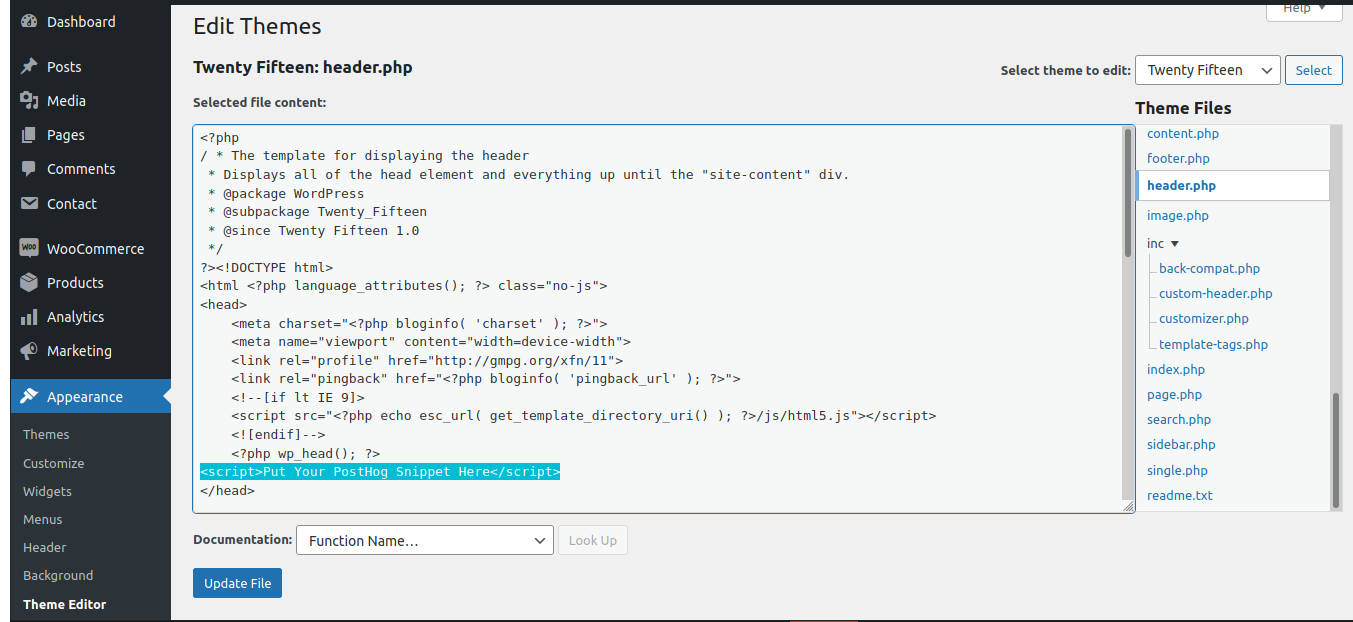

    Wordpress Theme Editor


  5. You should now see the contents of the header.php template file in the code editing view. It is recommended that you copy all the text/code and save it somewhere as a back-up.

  6. Find the closing </head> in the code editor and paste the PostHog snippet before it (see above image).

  7. Click the 'Update File' button at the bottom. You're good to go - PostHog should now be working on your WordPress website!

To confirm PostHog is configured correctly, visit your website and then check if the events from your session appear in PostHog. Note that this may take a few minutes.

Alternative ways to install

There are alternative ways to installing the PostHog analytics snippet on WordPress:

  • Use a WordPress header script insertion plug-in. Easy, but there are no official WordPress plug-ins for editing the header. Reviewing the quality of third-party plug-ins, including after they get updated by providers, is an additional responsibility. The benefit is that plug-ins can be easily turned on and off, and updated with a few clicks through the admin interface.

  • Some WordPress themes include additional functionality for inserting custom code into headers and footers. This is a convenient approach, so make sure to check if your theme has that option before installing a plug-in or editing header.php.

  • Manually edit the header template file in WordPress. This is usually header.php. This gives you the most control, but requires backend access and re-editing in case of updates. If your theme auto-updates, you may lose your settings. Making a Child Theme is the recommended approach.

Questions?

Was this page useful?

Next article

Message formatting

Message formatting works the same way whether you are using Slack, Microsoft Teams, or Discord. Tokens are in the format [type.property] . Message format can be customised when editing/creating an Action. Default By default, the message format is Types Action Allowed properties name : name of triggered action with link. Event Allowed properties name : name of the event which triggered the Action with link. Accessing event properties You can also access any property on the event that triggered…

Read next article

Share

Jump to:

  • Objective
  • Why is this useful?
  • TL;DR: (the short version)
  • Prerequisites
  • Step-by-step instructions
  • Alternative ways to install
  • Questions?
  • Edit this page
  • Raise an issue
  • Toggle content width
  • Toggle dark mode
  • About
  • Blog
  • Newsletter
  • Careers
  • Support
  • Contact sales

Product OS suite

Product overview

Analytics
  • Funnels
  • Trends
  • Paths

Pricing

Features
  • Session recording
  • Feature flags
  • Experimentation
  • Heatmaps

Customers

Platform
  • Correlation analysis
  • Collaboration
  • Apps

Community

Discussion
  • Questions?
  • Slack
  • Issues
  • Contact sales
Get involved
  • Roadmap
  • Contributors
  • Merch
  • PostHog FM
  • Marketplace

Docs

Getting started
  • PostHog Cloud
  • Self-hosted
  • Compare options
  • Tutorials
  • PostHog on GitHub
Install & integrate
  • Installation
  • Docs
  • API
  • Apps
User guides
  • Cohorts
  • Funnels
  • Sessions
  • Data
  • Events

Company

About
  • Our story
  • Team
  • Handbook
  • Investors
  • Careers
Resources
  • FAQ
  • Ask a question
  • Blog
  • Press
  • Merch
  • YouTube
© 2022 PostHog, Inc.
  • Code of conduct
  • Privacy
  • Terms