• Product
  • Pricing
  • Docs
  • Using PostHog
  • Community
  • Company
  • Login
  • Docs

  • Overview
    • Quickstart with PostHog Cloud
    • Overview
      • AWS
      • Azure
      • DigitalOcean
      • Google Cloud Platform
      • Hobby
      • Other platforms
      • Instance settings
      • Environment variables
      • Securing PostHog
      • Monitoring with Grafana
      • Running behind a proxy
      • Configuring email
      • Helm chart configuration
      • Deploying ClickHouse using Altinity.Cloud
      • Configuring Slack
      • Overview
        • Overview
        • Upgrade notes
        • Overview
        • 0001-events-sample-by
        • 0002_events_sample_by
        • 0003_fill_person_distinct_id2
        • ClickHouse
          • Backup
          • Kafka Engine
          • Resize disk
          • Restore
          • Vertical scaling
          • Horizontal scaling (Sharding & replication)
        • Kafka
          • Resize disk
          • Log retention
        • PostgreSQL
          • Resize disk
          • Troubleshooting long-running migrations
        • Plugin server
        • MinIO
        • Redis
        • Zookeeper
      • Disaster recovery
    • Troubleshooting and FAQs
    • Managing hosting costs
    • EU-only hosting
    • Overview
    • Ingest live data
    • Ingest historical data
    • Identify users
    • User properties
    • Deploying a reverse proxy
    • Libraries
    • Badge
      • Snippet installation
      • Android
      • iOS
      • JavaScript
      • Flutter
      • React Native
      • Browser Extensions
      • Elixir
      • Go
      • Java
      • Node.js
      • PHP
      • Python
      • Ruby
      • Docusaurus v2
      • Gatsby
      • Google Tag Manager
      • Next.js
      • Nuxt.js
      • Retool
      • RudderStack
      • Segment
      • Sentry
      • Slack
      • Shopify
      • WordPress
      • Message formatting
      • Microsoft Teams
      • Slack
      • Discord
    • To another self-hosted instance
    • To PostHog from Amplitude
    • Between Cloud and self-hosted
    • Overview
    • Tutorial
    • Troubleshooting
    • TypeScript types
    • Developer reference
    • Overview
    • POST-only public endpoints
    • Actions
    • Annotations
    • Cohorts
    • Dashboards
    • Event definitions
    • Events
    • Experiments
    • Feature flags
    • Funnels
    • Groups
    • Groups types
    • Insights
    • Invites
    • Members
    • Persons
    • Plugin configs
    • Plugins
    • Projects
    • Property definitions
    • Session recordings
    • Trends
    • Users
    • Data model
    • Overview
    • Data model
    • Ingestion pipeline
    • ClickHouse
    • Querying data
    • Overview
    • GDPR guidance
    • HIPAA guidance
    • CCPA guidance
    • Data egress & compliance
    • Data deletion
    • Overview
    • Code of conduct
    • Recognizing contributions
  • Using PostHog

  • Table of contents
      • Dashboards
      • Funnels
      • Group Analytics
      • Insights
      • Lifecycle
      • Path analysis
      • Retention
      • Stickiness
      • Trends
      • Heatmaps
      • Session Recording
      • Correlation Analysis
      • Experimentation
      • Feature Flags
      • Actions
      • Annotations
      • Cohorts
      • Data Management
      • Events
      • Persons
      • Sessions
      • UTM segmentation
      • Team collaboration
      • Organizations & projects
      • Settings
      • SSO & SAML
      • Toolbar
      • Notifications & alerts
    • Overview
      • Amazon Kinesis Import
      • BitBucket Release Tracker
      • Braze Import
      • Event Replicator
      • GitHub Release Tracker
      • GitHub Star Sync
      • GitLab Release Tracker
      • Heartbeat
      • Ingestion Alert
      • Email Scoring
      • n8n Connector
      • Orbit Connector
      • Redshift Import
      • Segment Connector
      • Shopify Connector
      • Twitter Followers Tracker
      • Zendesk Connector
      • Airbyte Exporter
      • Amazon S3 Export
      • BigQuery Export
      • Customer.io Connector
      • Databricks Export
      • Engage Connector
      • GCP Pub/Sub Connector
      • Google Cloud Storage Export
      • Hubspot Connector
      • Intercom Connector
      • Migrator 3000
      • PagerDuty Connector
      • PostgreSQL Export
      • Redshift Export
      • RudderStack Export
      • Salesforce Connector
      • Sendgrid Connector
      • Sentry Connector
      • Snowflake Export
      • Twilio Connector
      • Variance Connector
      • Zapier Connector
      • Downsampler
      • Event Sequence Timer
      • First Time Event Tracker
      • Property Filter
      • Property Flattener
      • Schema Enforcer
      • Taxonomy Standardizer
      • Unduplicator
      • Automatic Cohort Creator
      • Currency Normalizer
      • GeoIP Enricher
      • Timestamp Parser
      • URL Normalizer
      • User Agent Populator
  • Tutorials
    • All tutorials
    • Actions
    • Apps
    • Cohorts
    • Dashboards
    • Feature flags
    • Funnels
    • Heatmaps
    • Path analysis
    • Retention
    • Session recording
    • Trends
  • Support
  • Docs

  • Overview
    • Quickstart with PostHog Cloud
    • Overview
      • AWS
      • Azure
      • DigitalOcean
      • Google Cloud Platform
      • Hobby
      • Other platforms
      • Instance settings
      • Environment variables
      • Securing PostHog
      • Monitoring with Grafana
      • Running behind a proxy
      • Configuring email
      • Helm chart configuration
      • Deploying ClickHouse using Altinity.Cloud
      • Configuring Slack
      • Overview
        • Overview
        • Upgrade notes
        • Overview
        • 0001-events-sample-by
        • 0002_events_sample_by
        • 0003_fill_person_distinct_id2
        • ClickHouse
          • Backup
          • Kafka Engine
          • Resize disk
          • Restore
          • Vertical scaling
          • Horizontal scaling (Sharding & replication)
        • Kafka
          • Resize disk
          • Log retention
        • PostgreSQL
          • Resize disk
          • Troubleshooting long-running migrations
        • Plugin server
        • MinIO
        • Redis
        • Zookeeper
      • Disaster recovery
    • Troubleshooting and FAQs
    • Managing hosting costs
    • EU-only hosting
    • Overview
    • Ingest live data
    • Ingest historical data
    • Identify users
    • User properties
    • Deploying a reverse proxy
    • Libraries
    • Badge
      • Snippet installation
      • Android
      • iOS
      • JavaScript
      • Flutter
      • React Native
      • Browser Extensions
      • Elixir
      • Go
      • Java
      • Node.js
      • PHP
      • Python
      • Ruby
      • Docusaurus v2
      • Gatsby
      • Google Tag Manager
      • Next.js
      • Nuxt.js
      • Retool
      • RudderStack
      • Segment
      • Sentry
      • Slack
      • Shopify
      • WordPress
      • Message formatting
      • Microsoft Teams
      • Slack
      • Discord
    • To another self-hosted instance
    • To PostHog from Amplitude
    • Between Cloud and self-hosted
    • Overview
    • Tutorial
    • Troubleshooting
    • TypeScript types
    • Developer reference
    • Overview
    • POST-only public endpoints
    • Actions
    • Annotations
    • Cohorts
    • Dashboards
    • Event definitions
    • Events
    • Experiments
    • Feature flags
    • Funnels
    • Groups
    • Groups types
    • Insights
    • Invites
    • Members
    • Persons
    • Plugin configs
    • Plugins
    • Projects
    • Property definitions
    • Session recordings
    • Trends
    • Users
    • Data model
    • Overview
    • Data model
    • Ingestion pipeline
    • ClickHouse
    • Querying data
    • Overview
    • GDPR guidance
    • HIPAA guidance
    • CCPA guidance
    • Data egress & compliance
    • Data deletion
    • Overview
    • Code of conduct
    • Recognizing contributions
  • Using PostHog

  • Table of contents
      • Dashboards
      • Funnels
      • Group Analytics
      • Insights
      • Lifecycle
      • Path analysis
      • Retention
      • Stickiness
      • Trends
      • Heatmaps
      • Session Recording
      • Correlation Analysis
      • Experimentation
      • Feature Flags
      • Actions
      • Annotations
      • Cohorts
      • Data Management
      • Events
      • Persons
      • Sessions
      • UTM segmentation
      • Team collaboration
      • Organizations & projects
      • Settings
      • SSO & SAML
      • Toolbar
      • Notifications & alerts
    • Overview
      • Amazon Kinesis Import
      • BitBucket Release Tracker
      • Braze Import
      • Event Replicator
      • GitHub Release Tracker
      • GitHub Star Sync
      • GitLab Release Tracker
      • Heartbeat
      • Ingestion Alert
      • Email Scoring
      • n8n Connector
      • Orbit Connector
      • Redshift Import
      • Segment Connector
      • Shopify Connector
      • Twitter Followers Tracker
      • Zendesk Connector
      • Airbyte Exporter
      • Amazon S3 Export
      • BigQuery Export
      • Customer.io Connector
      • Databricks Export
      • Engage Connector
      • GCP Pub/Sub Connector
      • Google Cloud Storage Export
      • Hubspot Connector
      • Intercom Connector
      • Migrator 3000
      • PagerDuty Connector
      • PostgreSQL Export
      • Redshift Export
      • RudderStack Export
      • Salesforce Connector
      • Sendgrid Connector
      • Sentry Connector
      • Snowflake Export
      • Twilio Connector
      • Variance Connector
      • Zapier Connector
      • Downsampler
      • Event Sequence Timer
      • First Time Event Tracker
      • Property Filter
      • Property Flattener
      • Schema Enforcer
      • Taxonomy Standardizer
      • Unduplicator
      • Automatic Cohort Creator
      • Currency Normalizer
      • GeoIP Enricher
      • Timestamp Parser
      • URL Normalizer
      • User Agent Populator
  • Tutorials
    • All tutorials
    • Actions
    • Apps
    • Cohorts
    • Dashboards
    • Feature flags
    • Funnels
    • Heatmaps
    • Path analysis
    • Retention
    • Session recording
    • Trends
  • Support
  • Docs
  • Apps
  • Export
  • BigQuery Export

BigQuery Export

Last updated: Sep 07, 2022

On this page

  • What does the BigQuery Export app do?
  • What are the requirements for this app?
  • How do I install the BigQuery export app for PostHog?
  • How do I setup BigQuery permissions for PostHog?
  • Configuration
  • Why am I seeing duplicate PostHog events in BigQuery?
  • Is the source code for this app available?
  • Who created this app?
  • Who maintains this app?
  • What if I have feedback on this app?
  • What if my question isn't answered above?

What does the BigQuery Export app do?

This app streams events from PostHog directly into a BigQuery service account, as they are ingested. This is especially useful if you have an existing data warehouse or data lake running in BigQuery.

What are the requirements for this app?

The BigQuery Export app requires either PostHog Cloud, or a self-hosted PostHog instance running version 1.30.0 or later.

Not running 1.30.0? Find out how to update your self-hosted PostHog deployment!

You'll also need access to the BigQuery instance you want to export to.

How do I install the BigQuery export app for PostHog?

  1. Visit the 'Apps' page in your instance of PostHog.
  2. Search for 'BigQuery' and select the app, press Install.
  3. Follow the configuration steps:
    1. Upload your Google Cloud key .json file. (See below for permissions and how to retrieve this.)
    2. Enter your Dataset ID
    3. Enter your Table ID
  4. Watch events roll into BigQuery

How do I setup BigQuery permissions for PostHog?

To set the right permissions up for the BigQuery plugin, you'll need:

  1. A service account.
  2. A dataset which has permissions allowing the service account to access it.

Here's how to set these up so that the app has access only to the table it needs:

  1. Create a service account. Keep hold of the JSON file at the end of these steps for setting up the app, and remember the name too.

  2. Create a role which has only the specific permissions the PostHog BigQuery app requires (listed below), or use the built in BigQuery DataOwner permission. If you create a custom role, you will need:

    • bigquery.datasets.get
    • bigquery.tables.create
    • bigquery.tables.get
    • bigquery.tables.list
    • bigquery.tables.updateData
  3. Create a dataset within a BigQuery project (ours is called posthog, but any name will do).

  4. Follow the instructions on granting access to a dataset in BigQuery to ensure your new service account has been granted either the role you created or the "BigQuery Data Owner" permission.
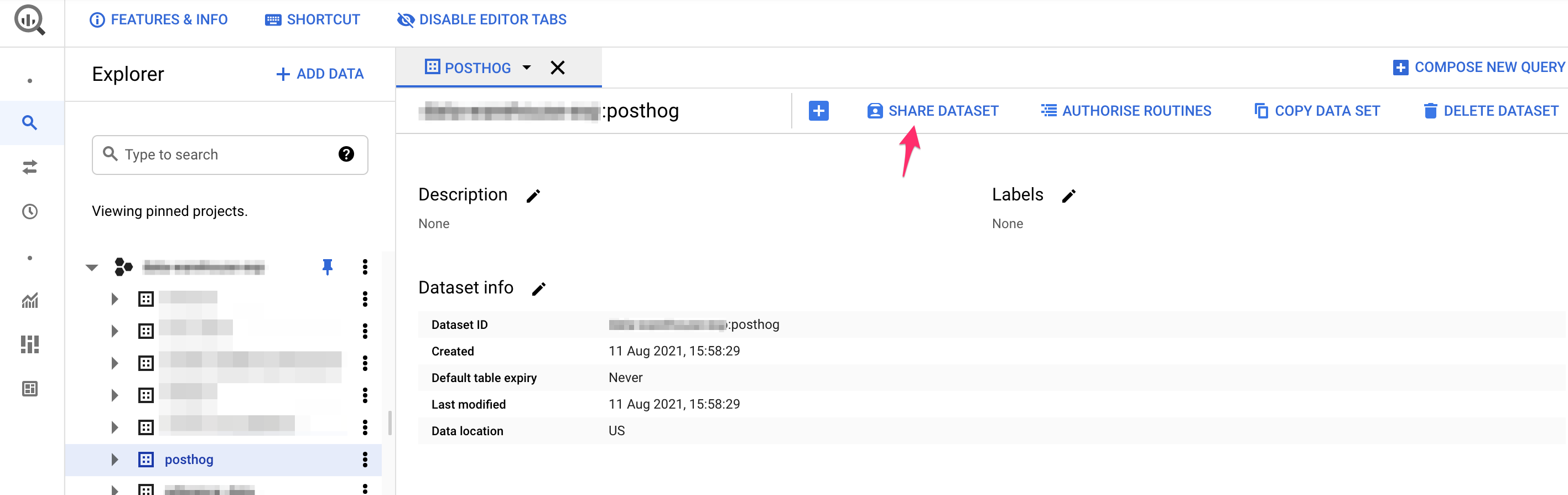
SQL_workspace_–_BigQuery_–_Data_Warehouse_Exp_–_Google_Cloud_Platform

Use the Share Dataset button to share your dataset with your new service account and either the BigQuery DataOwner role, or your custom role created above. In the below, we've used a custom role PostHog Ingest.

SQL_workspace_–_BigQuery_–_Data_Warehouse_Exp_–_Google_Cloud_Platform

That's it! Once you've done the steps above, your data should start flowing from PostHog to BigQuery.

Configuration

Why am I seeing duplicate PostHog events in BigQuery?

There's a very rare case when duplicate events appear in BigQuery. This happens due to network errors, where the export seems to have failed, yet it actually reaches BigQuery.

While this shouldn't happen, if you find duplicate events in BigQuery, follow these Google Cloud docs to manually remove the them.

Is the source code for this app available?

PostHog is open-source and so are all apps on the platform. The source code for the BigQuery Export app is available on GitHub.

Who created this app?

We'd like to thank PostHog team members Yakko Majuri, Marius Andra, Neil Kakkar, Michael Matloka and community member Edward Hartwell Goose for creating this BigQuery Export app.

Who maintains this app?

This app is maintained by PostHog. If you have issues with the app not functioning as intended, please raise a bug report to let us know!

What if I have feedback on this app?

We love feature requests and feedback! Please create an issue to tell us what you think.

What if my question isn't answered above?

We love answering questions. Ask us anything via our Support page.

You can also join the PostHog Community Slack group to collaborate with others and get advice on developing your own PostHog apps.

Questions?

Was this page useful?

Next article

Customer.io Connector

What does the Customer.io Connector app do? The Customer.io Connector sends event data from PostHog into Customer.io. User emails will also be sent if available and customers will be created in Customer.io. What are the requirements for this app? The Customer.io Connector requires either PostHog Cloud, or a self-hosted PostHog instance running version 1.30.0 or later. Not running 1.30.0? Find out how to update your self-hosted PostHog deployment ! You'll also need access to the relevant…

Read next article

Share

Jump to:

  • What does the BigQuery Export app do?
  • What are the requirements for this app?
  • How do I install the BigQuery export app for PostHog?
  • How do I setup BigQuery permissions for PostHog?
  • Configuration
  • Why am I seeing duplicate PostHog events in BigQuery?
  • Is the source code for this app available?
  • Who created this app?
  • Who maintains this app?
  • What if I have feedback on this app?
  • What if my question isn't answered above?
  • Questions?
  • Edit this page
  • Raise an issue
  • Toggle content width
  • Toggle dark mode
  • About
  • Blog
  • Newsletter
  • Careers
  • Support
  • Contact sales

Product OS suite

Product overview

Analytics
  • Funnels
  • Trends
  • Paths

Pricing

Features
  • Session recording
  • Feature flags
  • Experimentation
  • Heatmaps

Customers

Platform
  • Correlation analysis
  • Collaboration
  • Apps

Community

Discussion
  • Questions?
  • Slack
  • Issues
  • Contact sales
Get involved
  • Roadmap
  • Contributors
  • Merch
  • PostHog FM
  • Marketplace

Docs

Getting started
  • PostHog Cloud
  • Self-hosted
  • Compare options
  • Tutorials
  • PostHog on GitHub
Install & integrate
  • Installation
  • Docs
  • API
  • Apps
User guides
  • Cohorts
  • Funnels
  • Sessions
  • Data
  • Events

Company

About
  • Our story
  • Team
  • Handbook
  • Investors
  • Careers
Resources
  • FAQ
  • Ask a question
  • Blog
  • Press
  • Merch
  • YouTube
© 2022 PostHog, Inc.
  • Code of conduct
  • Privacy
  • Terms