• Product
  • Pricing
  • Docs
  • Using PostHog
  • Community
  • Company
  • Login
  • Docs

  • Overview
    • Quickstart with PostHog Cloud
    • Overview
      • AWS
      • Azure
      • DigitalOcean
      • Google Cloud Platform
      • Hobby
      • Other platforms
      • Instance settings
      • Environment variables
      • Securing PostHog
      • Monitoring with Grafana
      • Running behind a proxy
      • Configuring email
      • Helm chart configuration
      • Deploying ClickHouse using Altinity.Cloud
      • Configuring Slack
      • Overview
        • Overview
        • Upgrade notes
        • Overview
        • 0001-events-sample-by
        • 0002_events_sample_by
        • 0003_fill_person_distinct_id2
        • ClickHouse
          • Backup
          • Kafka Engine
          • Resize disk
          • Restore
          • Vertical scaling
          • Horizontal scaling (Sharding & replication)
        • Kafka
          • Resize disk
          • Log retention
        • PostgreSQL
          • Resize disk
          • Troubleshooting long-running migrations
        • Plugin server
        • MinIO
        • Redis
        • Zookeeper
      • Disaster recovery
    • Troubleshooting and FAQs
    • Managing hosting costs
    • EU-only hosting
    • Overview
    • Ingest live data
    • Ingest historical data
    • Identify users
    • User properties
    • Deploying a reverse proxy
    • Libraries
    • Badge
      • Snippet installation
      • Android
      • iOS
      • JavaScript
      • Flutter
      • React Native
      • Browser Extensions
      • Elixir
      • Go
      • Java
      • Node.js
      • PHP
      • Python
      • Ruby
      • Docusaurus v2
      • Gatsby
      • Google Tag Manager
      • Next.js
      • Nuxt.js
      • Retool
      • RudderStack
      • Segment
      • Sentry
      • Slack
      • Shopify
      • WordPress
      • Message formatting
      • Microsoft Teams
      • Slack
      • Discord
    • To another self-hosted instance
    • To PostHog from Amplitude
    • Between Cloud and self-hosted
    • Overview
    • Tutorial
    • Troubleshooting
    • TypeScript types
    • Developer reference
    • Overview
    • POST-only public endpoints
    • Actions
    • Annotations
    • Cohorts
    • Dashboards
    • Event definitions
    • Events
    • Experiments
    • Feature flags
    • Funnels
    • Groups
    • Groups types
    • Insights
    • Invites
    • Members
    • Persons
    • Plugin configs
    • Plugins
    • Projects
    • Property definitions
    • Session recordings
    • Trends
    • Users
    • Data model
    • Overview
    • Data model
    • Ingestion pipeline
    • ClickHouse
    • Querying data
    • Overview
    • GDPR guidance
    • HIPAA guidance
    • CCPA guidance
    • Data egress & compliance
    • Data deletion
    • Overview
    • Code of conduct
    • Recognizing contributions
  • Using PostHog

  • Table of contents
      • Dashboards
      • Funnels
      • Group Analytics
      • Insights
      • Lifecycle
      • Path analysis
      • Retention
      • Stickiness
      • Trends
      • Heatmaps
      • Session Recording
      • Correlation Analysis
      • Experimentation
      • Feature Flags
      • Actions
      • Annotations
      • Cohorts
      • Data Management
      • Events
      • Persons
      • Sessions
      • UTM segmentation
      • Team collaboration
      • Organizations & projects
      • Settings
      • SSO & SAML
      • Toolbar
      • Notifications & alerts
    • Overview
      • Amazon Kinesis Import
      • BitBucket Release Tracker
      • Braze Import
      • Event Replicator
      • GitHub Release Tracker
      • GitHub Star Sync
      • GitLab Release Tracker
      • Heartbeat
      • Ingestion Alert
      • Email Scoring
      • n8n Connector
      • Orbit Connector
      • Redshift Import
      • Segment Connector
      • Shopify Connector
      • Twitter Followers Tracker
      • Zendesk Connector
      • Airbyte Exporter
      • Amazon S3 Export
      • BigQuery Export
      • Customer.io Connector
      • Databricks Export
      • Engage Connector
      • GCP Pub/Sub Connector
      • Google Cloud Storage Export
      • Hubspot Connector
      • Intercom Connector
      • Migrator 3000
      • PagerDuty Connector
      • PostgreSQL Export
      • Redshift Export
      • RudderStack Export
      • Salesforce Connector
      • Sendgrid Connector
      • Sentry Connector
      • Snowflake Export
      • Twilio Connector
      • Variance Connector
      • Zapier Connector
      • Downsampler
      • Event Sequence Timer
      • First Time Event Tracker
      • Property Filter
      • Property Flattener
      • Schema Enforcer
      • Taxonomy Standardizer
      • Unduplicator
      • Automatic Cohort Creator
      • Currency Normalizer
      • GeoIP Enricher
      • Timestamp Parser
      • URL Normalizer
      • User Agent Populator
  • Tutorials
    • All tutorials
    • Actions
    • Apps
    • Cohorts
    • Dashboards
    • Feature flags
    • Funnels
    • Heatmaps
    • Path analysis
    • Retention
    • Session recording
    • Trends
  • Support
  • Docs

  • Overview
    • Quickstart with PostHog Cloud
    • Overview
      • AWS
      • Azure
      • DigitalOcean
      • Google Cloud Platform
      • Hobby
      • Other platforms
      • Instance settings
      • Environment variables
      • Securing PostHog
      • Monitoring with Grafana
      • Running behind a proxy
      • Configuring email
      • Helm chart configuration
      • Deploying ClickHouse using Altinity.Cloud
      • Configuring Slack
      • Overview
        • Overview
        • Upgrade notes
        • Overview
        • 0001-events-sample-by
        • 0002_events_sample_by
        • 0003_fill_person_distinct_id2
        • ClickHouse
          • Backup
          • Kafka Engine
          • Resize disk
          • Restore
          • Vertical scaling
          • Horizontal scaling (Sharding & replication)
        • Kafka
          • Resize disk
          • Log retention
        • PostgreSQL
          • Resize disk
          • Troubleshooting long-running migrations
        • Plugin server
        • MinIO
        • Redis
        • Zookeeper
      • Disaster recovery
    • Troubleshooting and FAQs
    • Managing hosting costs
    • EU-only hosting
    • Overview
    • Ingest live data
    • Ingest historical data
    • Identify users
    • User properties
    • Deploying a reverse proxy
    • Libraries
    • Badge
      • Snippet installation
      • Android
      • iOS
      • JavaScript
      • Flutter
      • React Native
      • Browser Extensions
      • Elixir
      • Go
      • Java
      • Node.js
      • PHP
      • Python
      • Ruby
      • Docusaurus v2
      • Gatsby
      • Google Tag Manager
      • Next.js
      • Nuxt.js
      • Retool
      • RudderStack
      • Segment
      • Sentry
      • Slack
      • Shopify
      • WordPress
      • Message formatting
      • Microsoft Teams
      • Slack
      • Discord
    • To another self-hosted instance
    • To PostHog from Amplitude
    • Between Cloud and self-hosted
    • Overview
    • Tutorial
    • Troubleshooting
    • TypeScript types
    • Developer reference
    • Overview
    • POST-only public endpoints
    • Actions
    • Annotations
    • Cohorts
    • Dashboards
    • Event definitions
    • Events
    • Experiments
    • Feature flags
    • Funnels
    • Groups
    • Groups types
    • Insights
    • Invites
    • Members
    • Persons
    • Plugin configs
    • Plugins
    • Projects
    • Property definitions
    • Session recordings
    • Trends
    • Users
    • Data model
    • Overview
    • Data model
    • Ingestion pipeline
    • ClickHouse
    • Querying data
    • Overview
    • GDPR guidance
    • HIPAA guidance
    • CCPA guidance
    • Data egress & compliance
    • Data deletion
    • Overview
    • Code of conduct
    • Recognizing contributions
  • Using PostHog

  • Table of contents
      • Dashboards
      • Funnels
      • Group Analytics
      • Insights
      • Lifecycle
      • Path analysis
      • Retention
      • Stickiness
      • Trends
      • Heatmaps
      • Session Recording
      • Correlation Analysis
      • Experimentation
      • Feature Flags
      • Actions
      • Annotations
      • Cohorts
      • Data Management
      • Events
      • Persons
      • Sessions
      • UTM segmentation
      • Team collaboration
      • Organizations & projects
      • Settings
      • SSO & SAML
      • Toolbar
      • Notifications & alerts
    • Overview
      • Amazon Kinesis Import
      • BitBucket Release Tracker
      • Braze Import
      • Event Replicator
      • GitHub Release Tracker
      • GitHub Star Sync
      • GitLab Release Tracker
      • Heartbeat
      • Ingestion Alert
      • Email Scoring
      • n8n Connector
      • Orbit Connector
      • Redshift Import
      • Segment Connector
      • Shopify Connector
      • Twitter Followers Tracker
      • Zendesk Connector
      • Airbyte Exporter
      • Amazon S3 Export
      • BigQuery Export
      • Customer.io Connector
      • Databricks Export
      • Engage Connector
      • GCP Pub/Sub Connector
      • Google Cloud Storage Export
      • Hubspot Connector
      • Intercom Connector
      • Migrator 3000
      • PagerDuty Connector
      • PostgreSQL Export
      • Redshift Export
      • RudderStack Export
      • Salesforce Connector
      • Sendgrid Connector
      • Sentry Connector
      • Snowflake Export
      • Twilio Connector
      • Variance Connector
      • Zapier Connector
      • Downsampler
      • Event Sequence Timer
      • First Time Event Tracker
      • Property Filter
      • Property Flattener
      • Schema Enforcer
      • Taxonomy Standardizer
      • Unduplicator
      • Automatic Cohort Creator
      • Currency Normalizer
      • GeoIP Enricher
      • Timestamp Parser
      • URL Normalizer
      • User Agent Populator
  • Tutorials
    • All tutorials
    • Actions
    • Apps
    • Cohorts
    • Dashboards
    • Feature flags
    • Funnels
    • Heatmaps
    • Path analysis
    • Retention
    • Session recording
    • Trends
  • Support
  • Using PostHog
  • Product manual
  • Optimization
  • Correlation Analysis

Correlation Analysis

Last updated: Sep 07, 2022

On this page

  • What is Correlation Analysis and what is it good for?
  • Using Correlation Analysis
  • What to do with this new found knowledge?
  • Making correlations accurate
  • Further reading
Where is this feature available?
Self-hosted plans
  • Not availableOpen-source
  • AvailableSelf-Serve
  • AvailableEnterprise
Cloud plans
  • Not availableFree
  • AvailableStartup
  • AvailableSelf-Serve
  • AvailableEnterprise

What is Correlation Analysis and what is it good for?

Correlation Analysis is a feature within Funnels that will automatically highlight significant factors that affect the conversion rate of users within the funnel.

The Funnels has the ability to directly compare conversion rates of users for a specific property via the breakdown feature. An example usage for the breakdown feature might be to see how the user's Operating System affects the conversion rate. However, this requires you to already have an initial hypothesis that Operating System may be a significant factor.

If you're not sure what might be a significant event or property in determining how likely someone is to convert, you can use Correlation analysis. This report will automatically highlighting significant events or properties. Given a funnel, PostHog will calculate the conversion rate for different slices (either by events performed, properties they have or properties for the events they performed) and surface any relevant signals.

Below is an example of what Correlation Analysis might look like:
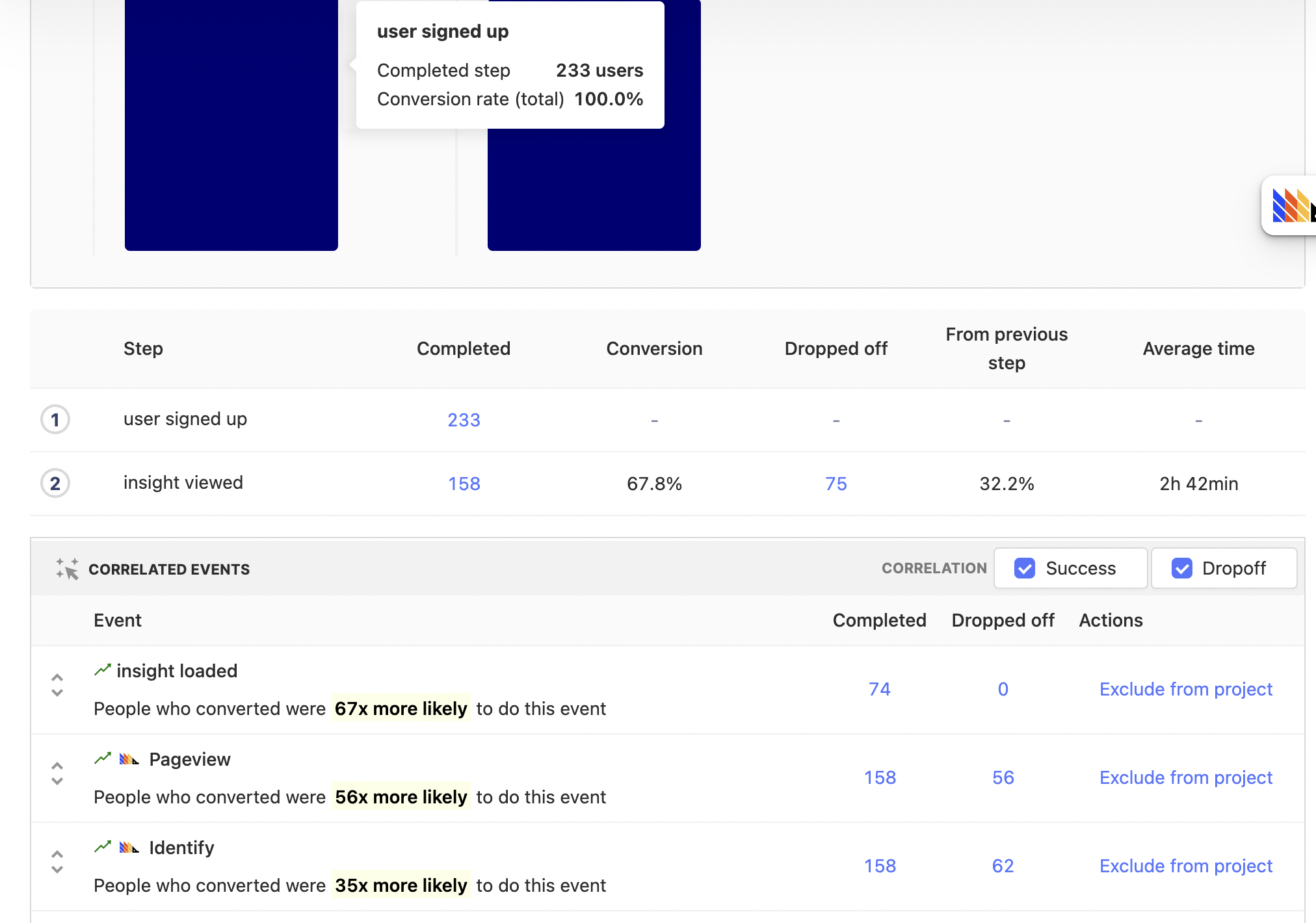
Correlation Analysis

Using Correlation Analysis

Suppose we have a funnel and we want to optimize it. The first thing we might want to do is identify if there is anything special about user that make them more or less likely to convert. With Correlation Analysis we can automatically identify which user properties are significant:
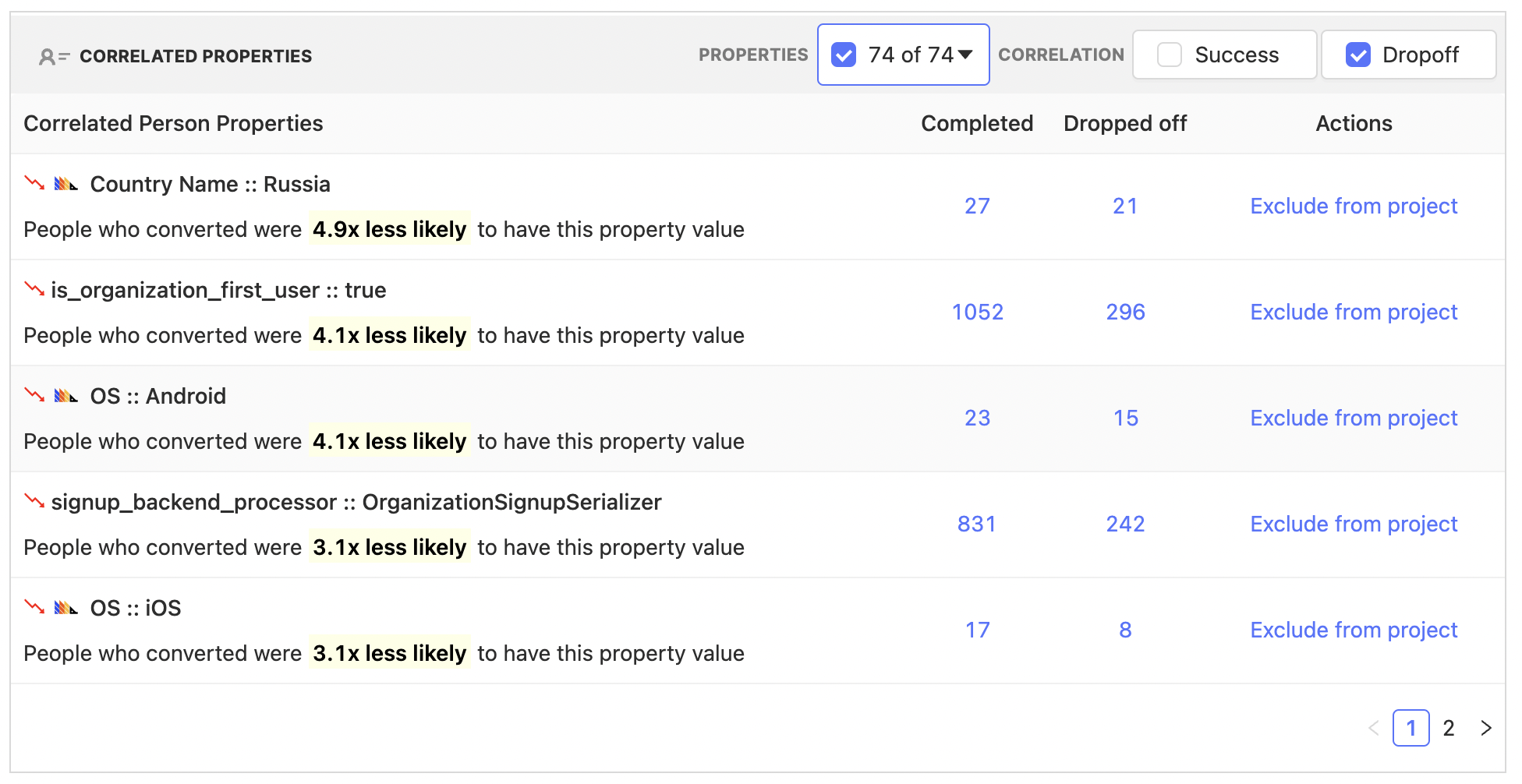
Person property correlations

Above we can see that the conversion rate of people using Android and iOS are 4.1x and 3.1x times less likely to convert in our example funnel. However, we also see other properties that may be of interest, for instance the "Country Name". This gives us some threads to pull on, perhaps we might look into internationalization, or ensure the app loads well in different regions.

Equally, we can see specific events that are correlated:
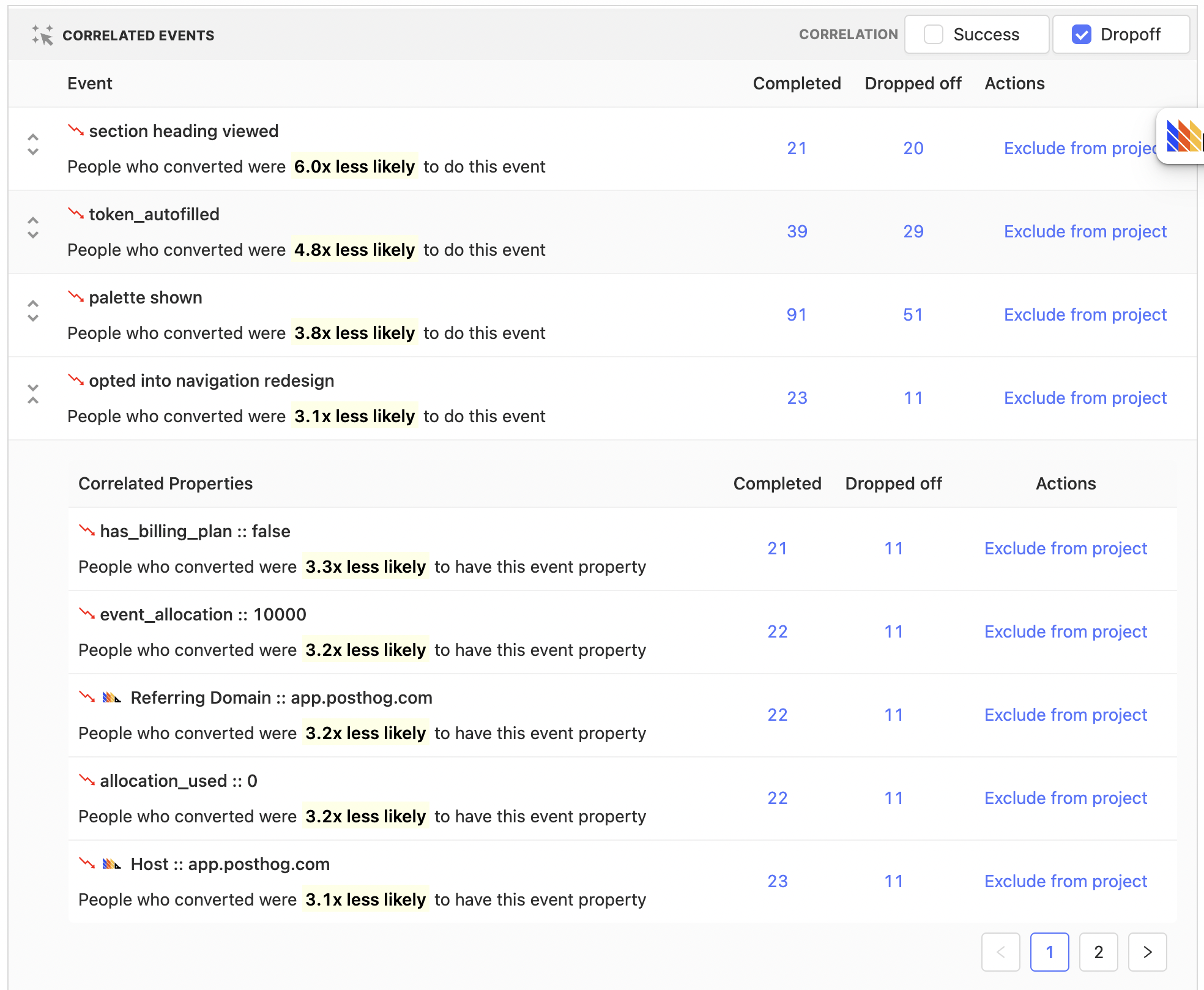
Event property correlations

Above we see that in our example funnel, users that performed the "opted into navigation redesign" event were 3.1x times less likely to convert.

We can drill down further to see how this events properties are correlated as well. Click on the expand event button to the left and we see that people that opted for the redesign and did not have a billing plan were 3.3x times less likely to convert.

Where we go from here requires further investigation, but the important point is that we now have strings to pull on which hopefully end up with actionable insights.

What to do with this new found knowledge?

One route for further exploration might be to drill down to the people that were considered for this specific event correlation. We can do so by clicking on the "Completed" and "Dropped off" numbers within a row. In the above case, users for both "Completed" and "Dropped off" will have performed the "opted into navigation redesign". "Completed" means the users fully completed the funnel, where as "Dropped off" users will include users who entered the funnel, but failed to make it through to the end.

Another option might be to take, for instance, the "Country Name" property and add this as a funnel breakdown to further explore and understand the affect it has on the funnel:
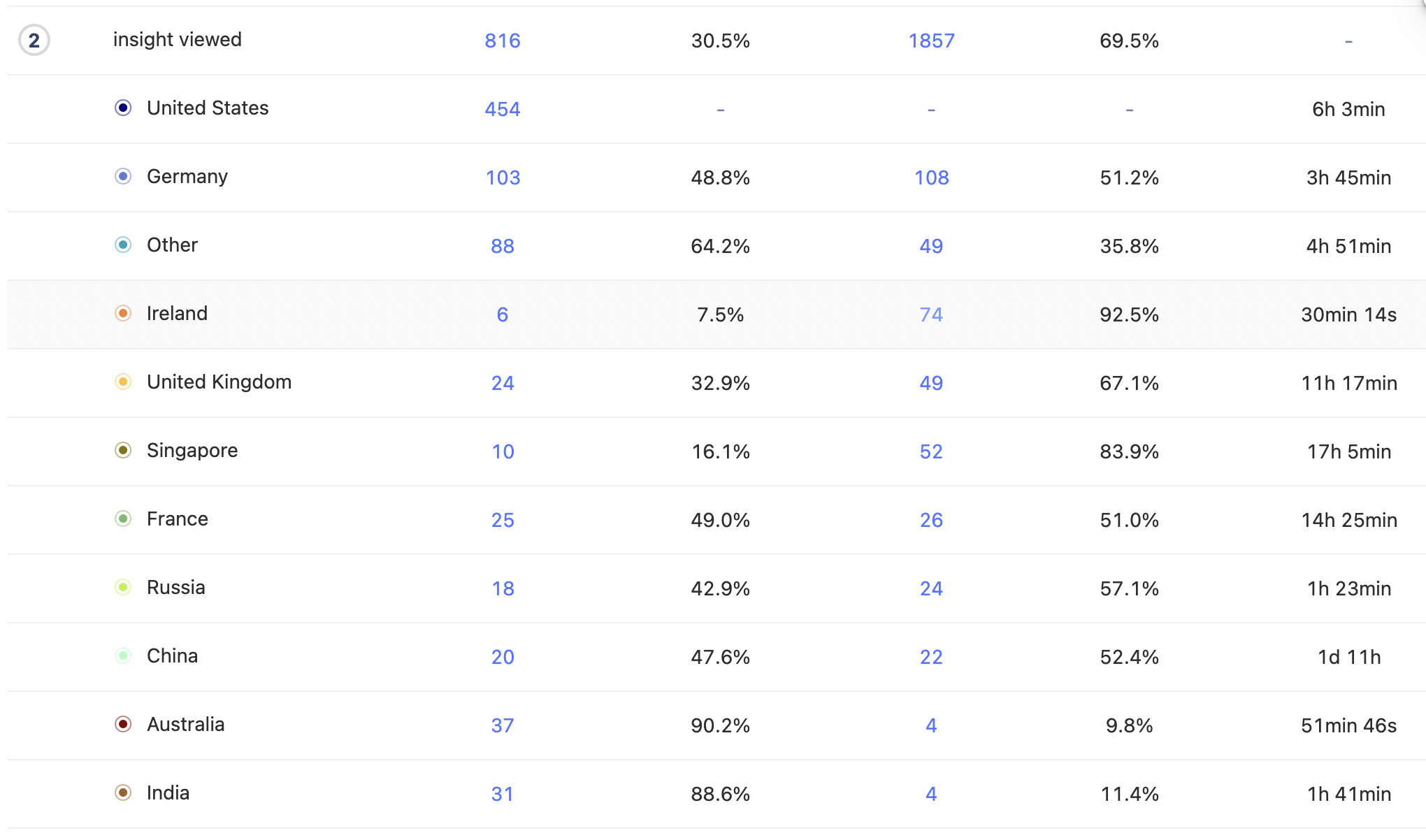
Breakdown by country

Making correlations accurate

You have better context on your product, and what could be a relevant signal or not. There will be some events and/or properties that perhaps have trivial correlations, or don't actually provide an actionable signal. To remove this potential distractions, use either the property names drop down to ignore them in analysis for a funnel in particular, or use the Exclude from project feature which will ensure that you and your team will not see correlations for these events and properties whilst within this project.

It's important to remember that the accuracy and therefore usefulness of any correlation is dependent on the sample size, if you've only got a handful of users for a specific correlation then it would be wise to try to increase this number. You can do this by, for instance, increasing the date range size of the funnel.

Further reading

Want to know more about what's possible with Correlation in PostHog? Try these tutorials:

  • How to correlate Sentry errors with PostHog data

Want more? Check our full list of PostHog tutorials.

Questions?

Was this page useful?

Next article

Experimentation

Experimentation helps you test changes to your product. You can test hypotheses about which changes will lead to optimal results. You may have also heard it called A/B testing, or split testing. Examples: You want to test which copy or visual design has the highest conversion. You want to test which flow leads to the highest number of purchases. You want to test if certain deals & promotions do better with users in a specific country. You want to test if showing your website copy in German does…

Read next article

Share

Jump to:

  • What is Correlation Analysis and what is it good for?
  • Using Correlation Analysis
  • What to do with this new found knowledge?
  • Making correlations accurate
  • Further reading
  • Questions?
  • Edit this page
  • Raise an issue
  • Toggle content width
  • Toggle dark mode
  • About
  • Blog
  • Newsletter
  • Careers
  • Support
  • Contact sales

Product OS suite

Product overview

Analytics
  • Funnels
  • Trends
  • Paths

Pricing

Features
  • Session recording
  • Feature flags
  • Experimentation
  • Heatmaps

Customers

Platform
  • Correlation analysis
  • Collaboration
  • Apps

Community

Discussion
  • Questions?
  • Slack
  • Issues
  • Contact sales
Get involved
  • Roadmap
  • Contributors
  • Merch
  • PostHog FM
  • Marketplace

Docs

Getting started
  • PostHog Cloud
  • Self-hosted
  • Compare options
  • Tutorials
  • PostHog on GitHub
Install & integrate
  • Installation
  • Docs
  • API
  • Apps
User guides
  • Cohorts
  • Funnels
  • Sessions
  • Data
  • Events

Company

About
  • Our story
  • Team
  • Handbook
  • Investors
  • Careers
Resources
  • FAQ
  • Ask a question
  • Blog
  • Press
  • Merch
  • YouTube
© 2022 PostHog, Inc.
  • Code of conduct
  • Privacy
  • Terms